As a precautionary measure, the Glow Blogs platform was temporarily taken offline.
This decision was made to allow our technical team to apply urgent security updates to protect the platform. These updates address recently discovered vulnerabilities in PHP – the foundational programming language that acts as the “engine” behind the scenes to make our WordPress websites run.
You may have seen news coverage regarding this software issue, as many other service providers globally have taken the exact same preventative steps to secure their systems.
We rolled out the necessary updates and conducted thorough testing.
All services are back online and access is restored.
Thank you for your patience and understanding as we prioritise the security of the platform.
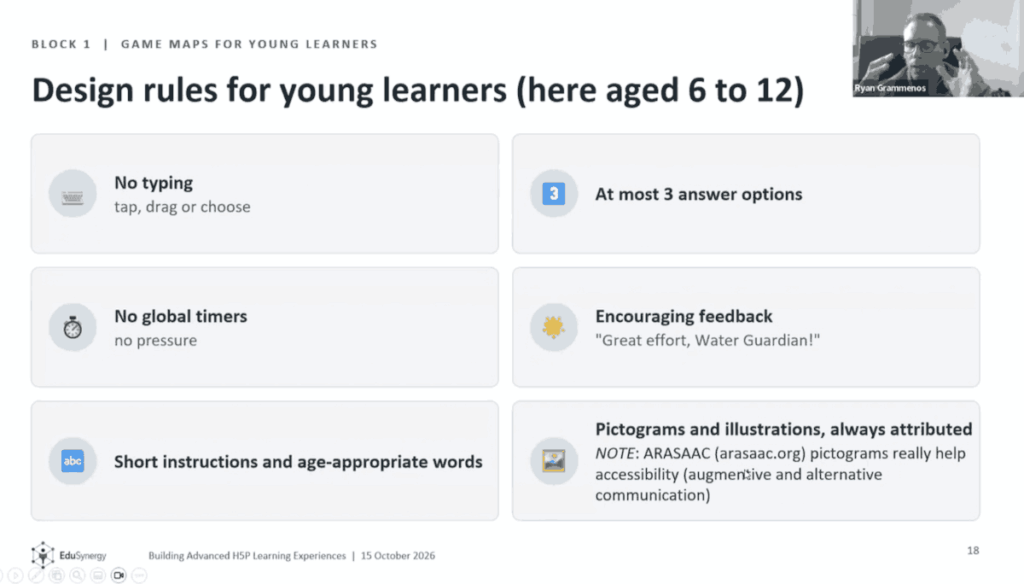
A recording of a webinar for teachers interested in building more complex learning.
The video explores content containers such as game maps and branching scenarios designed to encourage interactive, gamified education. The First Game map example is aimed at 9 year old pupils and the second for adult learners.
It provides a good workflow for creating content. The video does not show the editor in WordPress but the standalone editor uses has the same interface.
There are some great tips for designing and planning content.
The H5P Group provides a whole series of videos on their vimeo channel.
There has been a new release on Glow Blogs, dealing with some issues, updating themes and plugins.
Fixes
The Tiled Gallery Block is again available on Classic-themed sites. See the Tiled Gallery information on our blocks information site.
Problems with the appearance of widgets in the editor have been fixed.
A problem where raw HTML was displayed on some posts listed on Local Authority home pages has been fixed.
Jetpack blocks which are not suitable for Glow Blogs have been removed. These would have required linking with a WordPress.com account, involving payments and or external data storage.
Jetpack Custom Content Types are again available to activate. The activation process has changed a little, we have details on this post.
Plugin Updates
The following plugins have been updated, mostly minor bug and security fixes. These updates should not affect functionality.
Display Posts Shortcode
3D Flipbook Lite
Classic Editor
Contact Block Form
Google Translator Widget
MegaMenu
Simple Local Avatars
WordPress Importer
WP Accessibility
WP Post Ratings
Embed Plus for YouTube
Translations
Google have changed their permissions to limit the use of their translation widget limiting it to non profit sites. This had stopped the translation service working in some cases in Glow Blogs. We have now updated the Google Language Translator to the most recent version. This has fixed the problem. Details of how to use the plugin are here Google Language Translator.
Themes
Nearly all of the Twenty series of themes have been updated to the latest versions. Again, this should not affect basic functionality. Accessibility has been improved for some themes.
⚠️ We remind everyone about our recent Theme Advice. We advise people to choose from the Twenty series of Themes.
There can be a problem with changing privacy levels on a site with a lot of media (photos, video, audio etc.).
We are planning a change to Glow Blogs to prevent this. In the meantime we have some advice around changing site privacy.
The problem only affects sites with a lot of media.
When you make a privacy change all of the media files are moved. When there is a lot of media this can take some time. If you delete media from the Media Library while this change is taking place the process can become stuck and will need intervention from our developers.
You can avoid this problem by waiting until the media is all moved. You can view progress in the Dashboard setting page where you change privacy. A banner appears explaining that you cannot change privacy until the media has been moved.
Media is currently being moved to/from the public area, so Blog Visibility cannot be changed at the moment.
Revisit the page later or refresh your browser periodically, and wait until the notice disappears before you edit media.
If you are planning to remove media and change the privacy of the site, delete the media first. This will avoid problems and speed up the media move.
It also helps to change the privacy setting as infrequently as possible.
If you are changing privacy to hide a post or page while you do some editing there are simpler and less risky ways to do this:
Set the status for the page or post to Draft. You can work on the page or post and preview it while it is a draft.
Set the status to Pending Review.
Password protect the page.
You can change the status of multiple posts or pages in the Dashboard (Post on the Posts screen, Pages on the Pages screen). Just select them and use the Bulk actions dropdown choose Edit and click Apply.
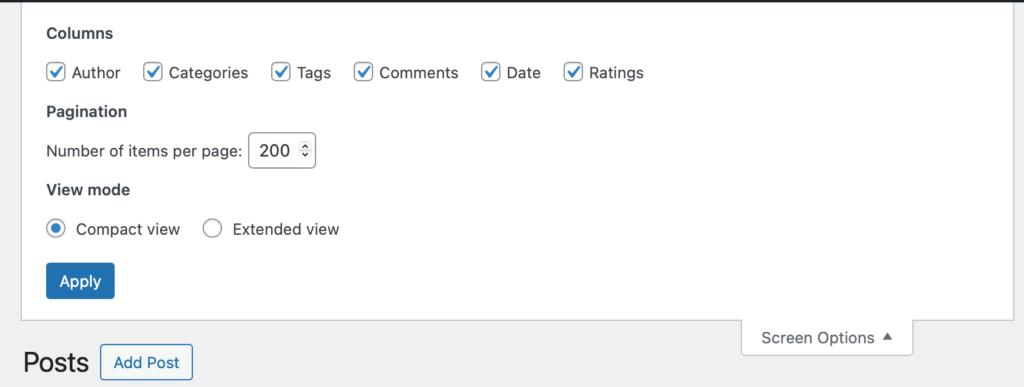
Tip: When working with multiple posts and pages you can change the number of items on the screen in the screen options at the top of the page.
Expand that section and change Number of items per page: to 200 (The maximum)
And press Apply. You can now edit 200 posts or pages at once.
Even after applying the fix about there may be a problem with any YouTube Videos in the Safari browser. There is currently not a fix for this. But there is a workaround.
Create and embed your content or edit the content. Make sure all the Display Options are ticked.
View a page with the content on it.
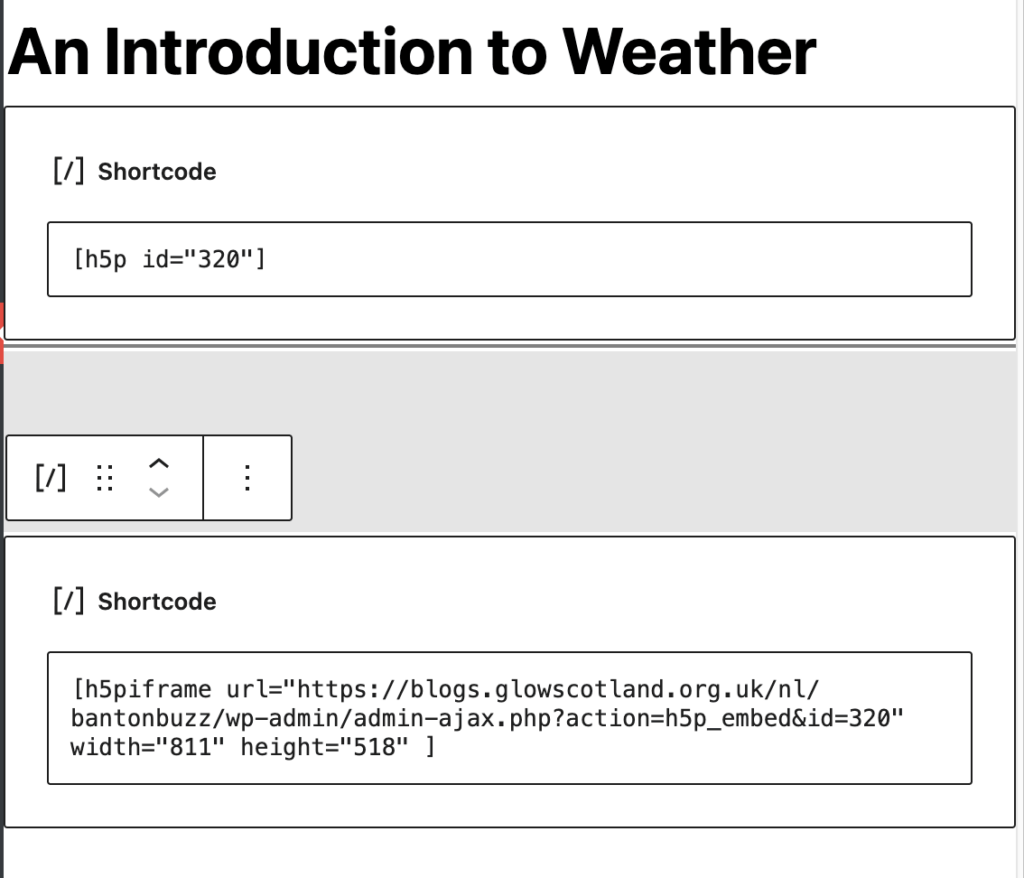
Click Embed and copy the code. This embed code will work when added to a post. You can replace the original code.
This will fix problems with any YouTube videos in Safari. It may be worth doing if you are providing H5P video content to learners using macs or iPads.
This screenshot show the original embed code and the one copied from the content. Do not use both in the same post.
If you are seeing this problem and have trouble fixing it, please get in touch, fill in the form.
There has been a new release on Glow Blogs, making some changes, dealing with some issues and updating themes and plugins.
Changes
Site Creation
This will have no effect on existing sites.
We have changed the default site created to use the block editor and the Twenty Twenty Five-Five theme, a block theme.
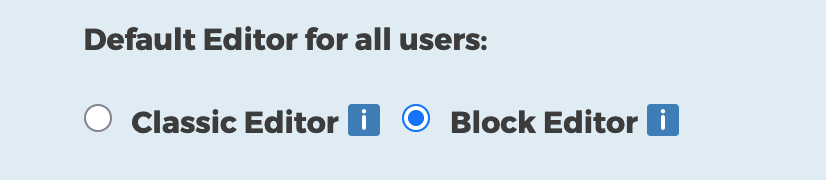
In the Blog creation form there are two choices: Classic or Blocks
Choosing Classic leads to the site being created with the Twenty Fourteen Theme and the Classic Editor being set.
Choosing Blocks leads to the site being created with the Twenty Twenty Five theme and the block editor being set.
You can have the same choice as before but the default has changed.
You can choose Classic if you wish. You can also change Editors and theme at any time so you can use the block editor with a classic theme after the site is created.
Theme Switch
We have changed the default theme when you choose Blocks from Twenty Twenty Three to Twenty Twenty Five. The Twenty Twenty Five theme is a lot less opinionated than the Twenty Twenty Three theme. The Twenty Twenty Three theme came with a fair amount of ‘boilerplate’ that is not suitable and over complex for the bulk of the type of sites typically created in Glow Blogs. Until recently we have been ‘protected’ from this problem by a bug with templates that our developers have just fixed.
The Twenty Twenty Five theme is the fastest and most efficient on the front end, loading less style sheets and other dependencies.
You can of course switch to Twenty Twenty Three or any other theme at any time. We have more information on themes and switching on the Themes Glow Blog Help page.
Quick Start Videos
We have added two Quick Start Videos to the Site Editor page. These show how to get started quickly with the site editor. One for simple blog type sites that consist in a series of posts, the other a school site that will be made up mostly of pages and organised hierarchically.
Editors
You can also change editors whenever you wish. You can also allow the switching of editors so posts can be made with either editor on the same site.
The Block editor was introduced in 2018 and to Glow Blogs in 2021. We would advise activating the block editor. If you are very familiar with the classic editor it is quite different so it would be a good idea to try it out. More information.
We have quite a few resources to help with the block editor, including a screencast demonstrating how to quickly create a school website using the site editor. We will be expanding that help over the next few weeks.
Fixes
Slow Menus problem
The problem with sites with a very large (>50) menus items having a problem with the menu editor has been fixed.
Missing Shortcode block
The problem with the shortcode block not being available on sites with a classic theme and using the block editor has been fixed.
Pupils Display Name
The problem with pupils not being able to set their display name to anything other than their first name has been fixed.
We would recommend that staff advise pupils either to stay with that option or to set a nickname.
Updates
Plugins
The Following plugins have been updated, mostly small bug and security fixes.
Draw Attention
H5P
WP Accessibility
Post Ratings
Themes
The Make theme has been updated to support more recent versions of WordPress. We would still advise thinking carefully about using the Make theme. It uses its own editing system. content created may not convert if the theme is changed. Skills learnt in the Make editor are not transferable to the classic or block editors.
No one in school can access a blog (perhaps staff have moved or retired)
You need to get your Local Authority to raise a call with the RM help desk.
Make sure you include the usernames you want added to a blog and the URL of the blog.
I can log on to Glow but I can’t access a blog where I have a role.
If you have just be added to the blog, get an admin for the blog check you have been added in the right way. If you are showing as NOT LOGGED IN YET, see this tip. If that doesn’t help you need to get your Local Authority to raise a call with the RM help desk.
Make sure you include your username and the URL of the blog.
We now recommend using The Blocks Editor to create posts & pages on your sites. Itis a newer way to edit posts and pages. It allows a lot more flexibility as to content and layout. We have a blog that explains more: Using the Blocks Editor in Glow Blogs.
The site editor is a new way to edit the look and design of your site. It goes much further than changing themes. More improvements should come to Glow Blogs in the session, when we wil provide more information.
H5P is a plugin that allows you to create & display on your site a whole range of interactive content, from quizzes, multi-choice and close exercises all the way to 360 tours. H5p examples.
Accessibility they are new ways to make you sites accessibly to different visitors. Accessibility is becoming even more important in web design and should be considered for all public blogs.
There has been a new release on Glow Blogs, dealing with some issues and updating themes and plugins.
Event Organiser
A security issue has developed with this plugin. We have temporarily patched(fixed) the problem for sites already using the plugin. We have also prevented the plugin from being installed on sites. If you remove the plugin, you will not be able to install it again. We hope there will be an update to the plugin soon. There is no issue with running the patched plugin.
Fixes
Widgets
A problem with widgets developed which affected new classic themed sites. To fix this issue we have moved to using Widget blocks in the Widget area of the dashboard and the Customizer in classic themed sites.
This will bring editing widgets in line with modern WordPress editing. There are many advantages to this:
You can use all of the blocks not just widgets and even lay them out in groups, columns etc.
The editing is more visual and supports drag and drop for arranging blocks.
Classic Widgets are in maintenance mode and may not get accessibility improvements.
Existing classic widgets are automatically wrapped in a Legacy Widget block. You will still be able to add widgets that are not block widgets by using the Legacy Widget block
The Widgets page of the help will be updated to reflect the changes.
Block Theme templates
An issue where the correct template was not applied in the site editor has been fixed.
Plugin Updates
The following plugins have be updated to newer versions.
3D Flipbook
H5P
Megamenu
Embed Plus for YouTube
The updates should not affect how you use these plugins.
If you are considering a theme change we would encourage you to read Theme Retirement News | Glow Blog Help. In general choosing one of the Twenty themes is a good idea.
As always please get in touch if you need more information.
Glow Blogs offers several themes to change the look and functionality of sites. In the same way as plugins, we rely on third-party, usually open source, developers.
Both themes and plugins need to be regularly updated.
Updates aren’t only for new features updates also keep everything working well together. We regularly update WordPress itself, and themes and plugins need to keep pace with those changes. Outdated add-ons can cause your site to slow down, behave oddly, or stop working in parts.
If a theme or plugin stops being updated we have to assess it and in many cases remove it from the system. For example, back in 2020 we removed a dozen themes from the system that had not been updated for several years.
Currently we have three themes that are being considered for retirement , Yoko, Agama Pro & Make.
As in the previous retirement we will be taking a staged approach:
Advising you not to use these themes.
Disabling the option to select these themes for new sites or to change to these themes. If your site already uses one of them, it will be unaffected at this point.
Retirement (further down the line) with plenty of notice, we’ll retire the themes fully and help users move to a supported alternative. This is still a long way off, and we’ll communicate clearly before anything happens.
For the moment we would advise against choosing these themes. Yoko is a simple theme and many of the other themes are suitable replacements. Twenty Sixteen is, in our opinion, particularly suitable for a classic news or blog style site. We have guide to moving from Yoko to Twenty Sixteen.
Agama Pro and Make will be a bit more difficult to move from. Both offer custom layouts. Make in particular has a lot of unique ways to change layouts. These will not convert easily if you just switch the theme.
Fortunately most of the features of these themes can be replicated in the the Block Editor and Site Editor with block themes. We would recommend Twenty Twenty Five for this. We will have further advice on moving on from these themes in the future.
Agama Pro is a very opinionated theme, this may make it difficult to move to a more modern theme . We would not recommend choosing it.
The Make theme has its own page builder. You cannot use the newer Block Editor with the Make theme. You can use the older classic editor or Make’s own Post Builder. Be careful when choosing the Make theme, it allows advanced page layout in its page builder but you will not be able to use blocks. It is also difficult to convert content created with Make’s page template to other themes. Some converted pages do not work at all.
Please get in touch if you would like more information.
This upgrade focuses on collaboration, editing improvements, new blocks, accessibility, and performance. Here are the main changes. We have put then in a new accordion block, so click the headings to expand each section and find out more.
A new accordion block lets you create expandable/collapsible sections without plugins. Good for FAQs, long pages, or menus. We have used this block to show you the update information. Read more about The Accordion Block on the Blocks Blog.
Example
A stretchy heading fills the available space. There is a stretchy paragraph block too:
This is stretchy and fills the space.
We would recommend typing a paragraph and then transforming that to stretchy. More information on the Blocks Site.
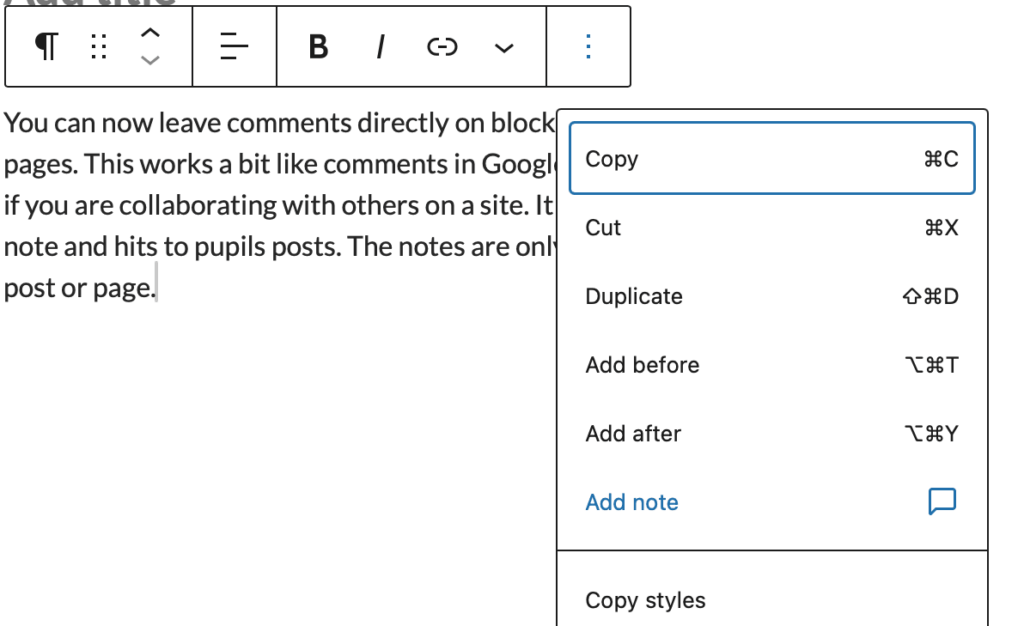
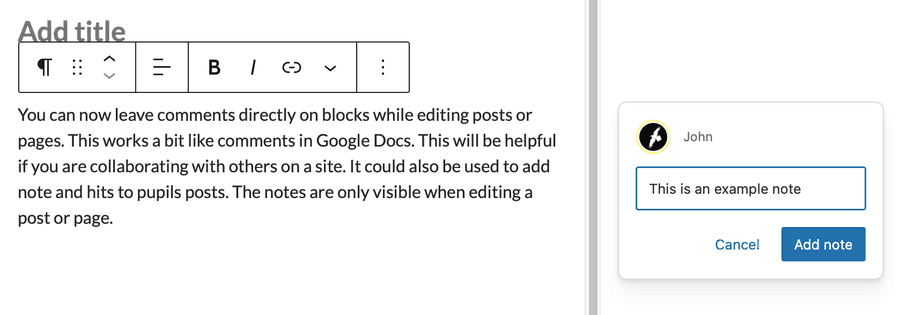
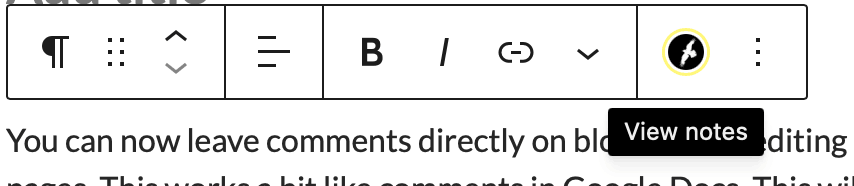
You can now leave comments directly on blocks while editing posts or pages. This works a bit like comments in Google Docs. This will be helpful if you are collaborating with others on a site. It could also be used to add note and hits to pupils posts. The notes are only visible when editing a post or page.
You add a note from the ellipses on a block toolbar.
The Block appears in the side bar.
Block with notes attached show a users icon.
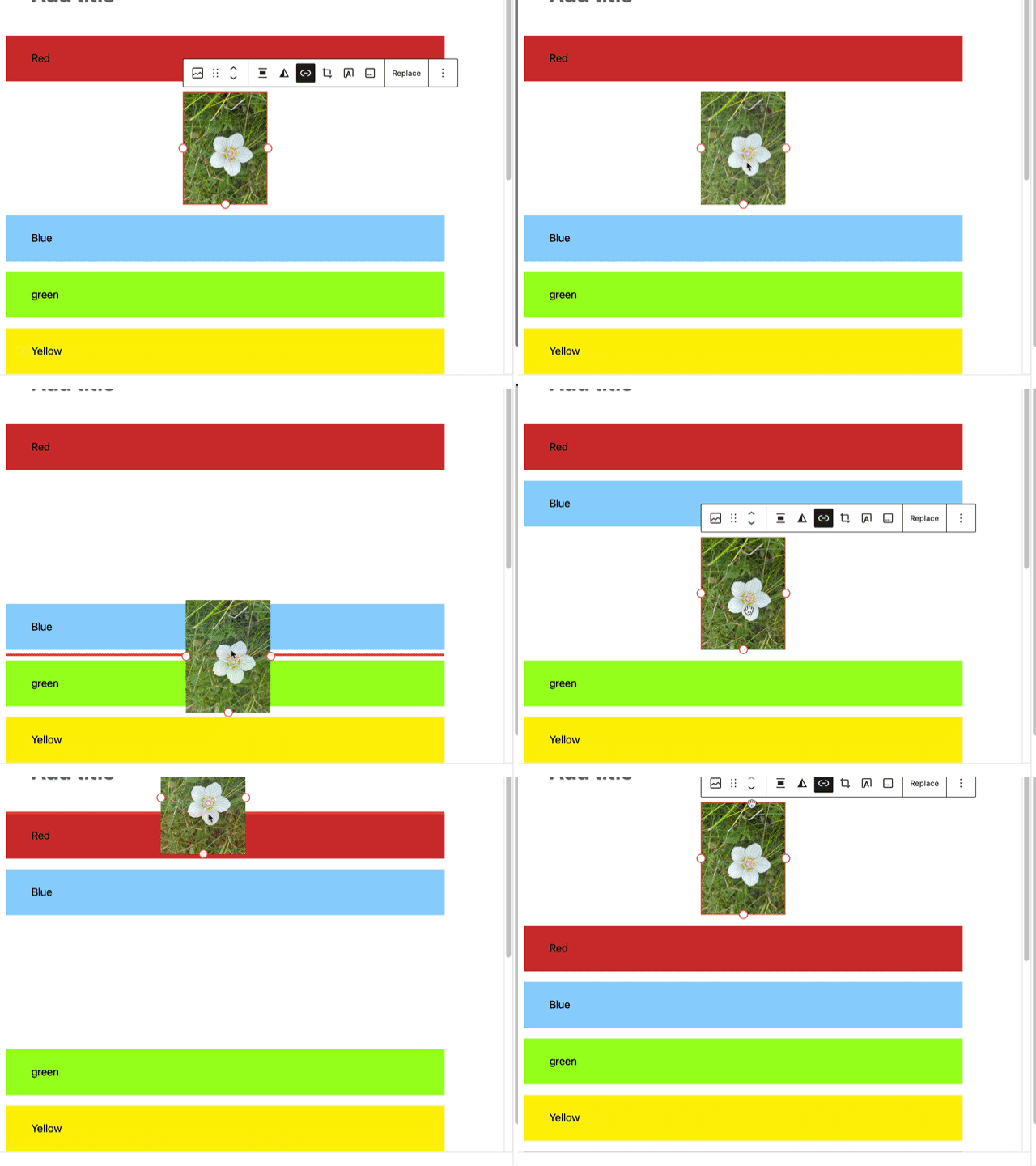
Moving blocks around is now more visual, with clearer drag handles and live previews while dragging content. This makes layout editing feel smoother and more predictable.
Gallery blocks can now enforce a consistent aspect ratio across images, helping galleries look tidier without manual image cropping.
This video has no sound
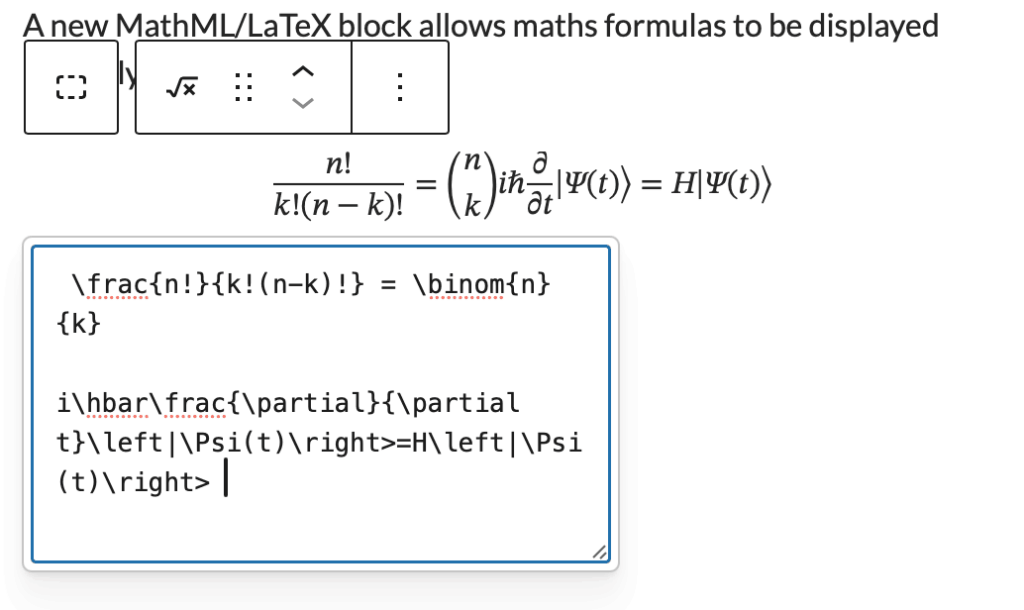
A new MathML/LaTeX block allows maths formulas to be displayed properly in posts and pages.
for example
You can automatically show estimated reading time for posts. This can be used in the Query Loop.
2–3 minutes
Several blocks for use in designing category or tag pages in the block editor, including term-count, term-name, term-template & terms-query. Of interest to people doing advanced editing in the site editor.
The Command Palette has expanded beyond the editor, letting power users jump quickly to templates, pages, settings, and other admin areas using keyboard shortcuts. Likely to be of interest to people who are doing a lot of site design work in the site Editor.
WordPress 6.9 includes a large number of accessibility fixes 70+ accessibility fixes and enhancements focus on central areas of the WordPress experience.
Several frontend performance improvements aim to make sites load faster.