Tag Archives: themes

Glow Blogs Update 27 Aug 2026

There has been a new release on Glow Blogs, making some changes, dealing with some issues and updating themes and plugins.

Changes

Site Creation

This will have no effect on existing sites.

We have changed the default site created to use the block editor and the Twenty Twenty Five five theme, a block theme.

In the Blog creation form there are two choices: Classic or Blocks

  • Choosing Classic leads to the site being created with the Twenty Fourteen Theme and the Classic Editor being set.
  • Choosing Blocks leads to the site being created with the Twenty Twenty Five theme and the block editor being set.
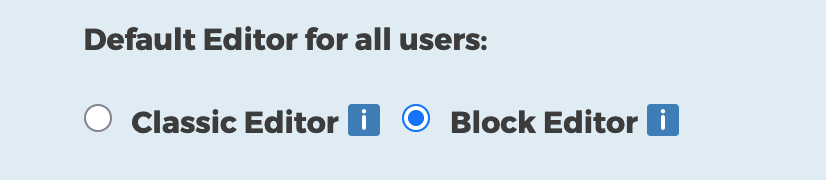
Classic or blocks radio buttons

You can have the same choice as before but the default has changed.

You can choose Classic if you wish. You can also change Editors and theme at any time so you can use the block editor with a classic theme after the site is created.

Theme Switch

We have changed the default theme when you choose Blocks from Twenty Twenty Three to Twenty Twenty Five. The Twenty Twenty Five theme is a lot less opinionated than the Twenty Twenty Three theme. The Twenty Twenty Three theme came with a fair amount of ‘boilerplate’ that is not suitable and over complex for the bulk of the type of sites typically created in Glow Blogs. Until recently we have been ‘protected’ from this problem by a bug with templates that our developers have just fixed.

The Twenty Twenty Five theme is the fastest and most efficient on the front end, loading less style sheets and other dependencies.

You can of course switch to Twenty Twenty Three or any other theme at any time. We have more information on themes and switching on the Themes Glow Blog Help page.

Quick Start Videos

We have added two Quick Start Videos to the Site Editor page. These show how to get started quickly with the site editor. One for simple blog type sites that consist in a series of posts, the other a school site that will be made up mostly of pages and organised hierarchically.

Editors

You can also change editors whenever you wish. You can also allow the switching of editors so posts can be made with either editor on the same site.

The Block editor was introduced in 2018 and to Glow Blogs in 2021. We would advise activating the block editor. If you are very familiar with the classic editor it is quite different so it would be a good idea to try it out. More information.

We have quite a few resources to help with the block editor, including a screencast demonstrating how to quickly create a school website using the site editor. We will be expanding that help over the next few weeks.

Fixes

Slow Menus problem

The problem with sites with a very large (>50) menus items having a problem with the menu editor has been fixed.

Missing Shortcode block

The problem with the shortcode block not being available on sites with a classic theme and using the block editor has been fixed.

Pupils Display Name

The problem with pupils not being able to set their display name to anything other than their first name has been fixed.

We would recommend that staff advise pupils either to stay with that option or to set a nickname.

Updates

Plugins

The Following plugins have been updated, mostly small bug and security fixes.

  • Draw Attention
  • H5P
  • WP Accessibility
  • Post Ratings

Themes

The Make theme has been updated to support more recent versions of WordPress. We would still advise thinking carefully about using the Make theme. It uses its own editing system. content created may not convert if the theme is changed. Skills learnt in the Make editor are not transferable to the classic or block editors.

Theme Retirement News

Glow Blogs offers several themes to change the look and functionality of sites. In the same way as plugins, we rely on third-party, usually open source, developers.

Both themes and plugins need to be regularly updated.

Updates aren’t only for new features updates also keep everything working well together. We regularly update WordPress itself, and themes and plugins need to keep pace with those changes. Outdated add-ons can cause your site to slow down, behave oddly, or stop working in parts.

If a theme or plugin stops being updated we have to assess it and in many cases remove it from the system. For example, back in 2020 we removed a dozen themes from the system that had not been updated for several years.

Currently we have three themes that are being considered for retirement , Yoko, Agama Pro & Make.

As in the previous retirement we will be taking a staged approach:

  1. Advising you not to use these themes.
  2. Disabling the option to select these themes for new sites or to change to these themes. If your site already uses one of them, it will be unaffected at this point.
  3. Retirement (further down the line) with plenty of notice, we’ll retire the themes fully and help users move to a supported alternative. This is still a long way off, and we’ll communicate clearly before anything happens.
Retirement News on Glow Connect

For the moment we would advise against choosing these themes. Yoko is a simple theme and many of the other themes are suitable replacements. Twenty Sixteen is, in our opinion, particularly suitable for a classic news or blog style site. We have guide to moving from Yoko to Twenty Sixteen.

Agama Pro and Make will be a bit more difficult to move from. Both offer custom layouts. Make in particular has a lot of unique ways to change layouts. These will not convert easily if you just switch the theme.

Fortunately most of the features of these themes can be replicated in the the Block Editor and Site Editor with block themes. We would recommend Twenty Twenty Five for this. We will have further advice on moving on from these themes in the future.

Agama Pro is a very opinionated theme, this may make it difficult to move to a more modern theme . We would not recommend choosing it.

The Make theme has its own page builder. You cannot use the newer Block Editor with the Make theme. You can use the older classic editor or Make’s own Post Builder. Be careful when choosing the Make theme, it allows advanced page layout in its page builder but you will not be able to use blocks. It is also difficult to convert content created with Make’s page template to other themes. Some converted pages do not work at all.

Please get in touch if you would like more information.

Glow Blogs Update 27 Jan 2021

Glow Blogs has a small update yesterday at 4pm

There are two new Plugins.

Mega Menus Max Mega Menu – WordPress Mega Menu Plugin 
This is a really powerful menu plugin, it will give more responsive and accessible menus. It also fixes the problem with the Yoko theme’s menus on mobile.

WP Accessibility

This plug-in helps with a variety of common accessibility problems in WordPress themes. While most accessibility issues can’t be addressed without directly changing your theme, WP Accessibility adds a number of helpful accessibility features with a minimum amount of setup or expert knowledge.

New themes:

Twenty Nineteen, Twenty Twenty and Twenty Twenty One.
These Themes are particularly designed for the New Gutenberg Editor. They will come into their own when we have tested and implemented the new editor.  The themes will function well using the current editor.

Various Themes have been updated to the latest version.

New sources of external services to embed

The ability to embed content from more external services including FlipGrid, Padlet, Thinglink, Waklet, Micro:bit & Prezi. We now have a blog showing how various embeds work: Embeds – Examples of embedding content from other sites on Glow Blogs