
Widgets are used to add features and functionality to your site. Widget placement is dependent on themes.
Classic themes use widgets to add content and features to areas such as sidebars and footers. Widgets are managed separately from posts and pages and can be rearranged easily.
Block themes use blocks instead of traditional widgets, letting you build and customise template areas like headers, footers and sidebars using the same block editor as posts and pages.
Blocks
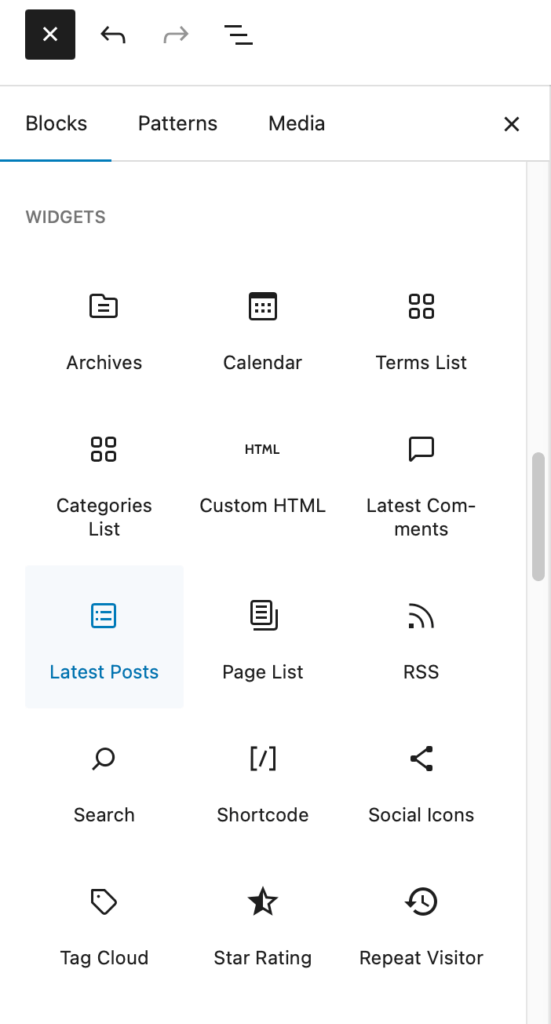
In Block themes you can use widgets like any other block. It is likely that you would use these when designing or editing templates or templates areas in the site Editor.
You can see the list of available widgets in the Widgets section of the Block inserter. Details of these widgets can be found on our Blocks site.
Note some widgets that are available in classic sites are not present in block themes.

I was looking to find a way to add a countdown widget to my page. Every time I tried the iframe was blocked or JScript wasn’t allowed.
is there a quick fix for this?
https://blogs.glowscotland.org.uk/gc/skikpss/
Hi,
There is a Milestone Widget that will let you do exactly that. I’ve just added an example to the righthand side of this site.
You need to:
1. Activate the Jetpack Plugin if it is not active
In Jetpack settings (which will be in the dashboard once the plugin is active) Turn on extra sidebar widgets.
In Appearance->Widgets add the Milestone Widget and configure.
I’ll drop you an emai lwith this information too.