Author: George Milliken

cyber secondary teachers

Cyber Resilience and Internet Safety for secondary teachers

This section aims to provide ideas, information and professional learning to support secondary teachers develop confident and responsible children and young people that are cyber resilient or interested in studying cyber security.

  go to cyber home

Cyber resources

cyberfirst courses for learners

CyberFirst offers a range of learning courses and resources from age 11, including:

  • Trailblazers
  • Adventurers
  • Defenders
  • Futures

go to CyberFirst courses

living in a digital worldExperience an interactive journey into the world of cybersecurity. This resource shines a light on some of the most important topics for how to stay safe inside the digital world and gives practical suggestions that help improve cyber resilience. 

go to Living in a Digital World

This set of resources combines the SQA level 4 units in Cyber Security Fundamentals and Internet Safety

They reinforce our belief that every learner should have the knowledge and skills to use the internet and online services safely, allowing them to spot potential risks and recover from any potential harm, they face while using online services. 

go to Level 4 resources

cyber 9 12 strategy challenge

This module has primarily been developed to further enhance the skills of the learners to take part in, for example, cyber competitions and challenges including the Cyber 9/12 College and Universities competition. 

   go to Cyber 9/12 Strategy Challenge page

Understanding cyber resilience and internet safety

cyber toolkit

The Teacher Cyber Toolkit is the main page for information, ideas and resources for teachers. It splits internet use into: consume, create or communicate and has resources and information for each of these.

go to Cyber Toolkit

Teacher Digital Skills ToolkitStart here if you need support with basic digital literacy skills, such as creating passwords, logging in to Glow or connecting to Wi-Fi.

go to Teacher Digital Skills toolkit

this is cyber clpl

This is Cyber Resilience and Internet Safety is the next step for teachers more confident in their own digital literacy. There are four sessions to choose from whether you are planning lessons or creating guidance for your school or community.

go to This is Cyber CLPL

Cyber across the curriculum

Cyber resilience and internet safety can be incorporated into other curricular areas, below are links to those which are ‘responsibilities of all’. This has been kept concise for simplicity but there are many other aspects that could be explored by teachers.

cyber security for secondary schools

Cyber security can be studied in Scottish education as a discrete subject. It offers challenge, problems to solve and opportunities. 

go to cyber security

cyber in health and wellbeing

There are lots of areas of our lives now touched by digital technology and cyber resilience can help keep them safer, more private and fairer. 

go to cyber in HWB

cyber in literacy and english

More of the information we consume is now online, in the form of news, social media and literature. Learners need support to find, evaluate and make use of these texts.

go to cyber in literacy


cyber primary teachers

Cyber Resilience and Internet Safety for primary teachers

This section aims to provide ideas, information and professional learning to support primary teachers develop confident and responsible children and young people that are cyber resilience.

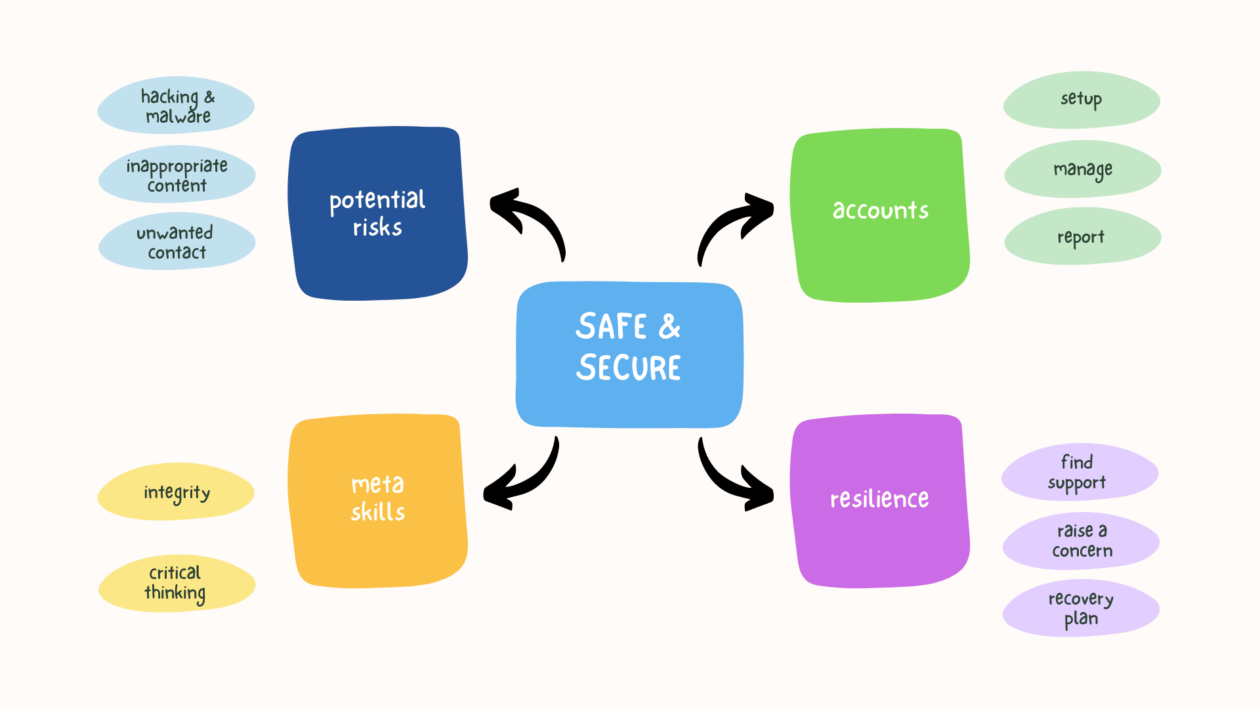
The key skills and knowledge for teaching cyber resilience can be found in the image opposite. The image can also be viewed with this link:
go to cyber resilience digital skills guide

These basic cyber resilience skills form part of the Learner Digital Skills toolkit for Digital Literacy in Curriculum for Excellence.

cyber toolkitThe Cyber Resilience Toolkit explains the main risks, potential harms and strategies to support children and young people reduce the risk of using the internet.

go to Cyber Toolkit


cyber resilience lessons

These cyber resilience lessons for primary and secondary learners are designed to be easy-to-use for educators, engaging for learners and to develop their resilience.

go to Cyber Lessons


Systematic literature review of digital risk This literature review, produced by the University of Glasgow, is clear about the need for children and young people to learn digital skills to help them become cyber resilient. It underpins our work on cyber resilience and internet safety.

Read the report here

Additional resources

Bongles Text imageThe Bongles is story for younger learners that introduces the basic concepts of keeping devices secure with passcodes. 
There are resources for teachers to support the learning.

go to The Bongles

CyberSprinters is an online game for 7-11 year olds that introduces the basics of cyber hygiene and security.
There are resources for teachers to support the learning.

go to CyberSprinters

CyberFirst Navigators is a series of interactive videos and supporting resources for 11–14 year olds.

go to CyberFirst Navigators

digital schools award

Digital Schools Award Scotland (DSAS)

Digital Schools Awards is a national awards scheme to promote, recognise and encourage a whole school approach to the use of digital technology in schools.

The Digital Schools Award Scotland (DSAS) programme helps schools assess progress and recognise excellence in the use of digital technology at nursery, primary, special education and secondary level while providing practical support and encouragement.

Discover how the digital schools award framework can support your setting to lead digital learning, teaching and assessment.

digital school

Learn more

DSAS Validation

Hear from one of the Digital Schools Award for Scotland validators, Catherine Cunningham share an overview of the purpose and structure of the award framework and criteria.  Catherine provides helpful advice and top tips from starting your journey in registering for the award through to the validation visit and what to expect.

Tullialan Nursery School, Fife

Hear from Amanda Sloper, DHT, share how the framework helped transform the culture and how digital is now embedded across the early level curriculum.

Fintry Primary, Dundee

Hear from Jayne Mays a class teacher and digital leader share her insights and top tips into how the DSAS framework transformed and supported practitioners to embed digital learning across the primary curriculum.  Jayne will also share how the school have continued to provide innovate digital learning experiences for all their learners.

Braes High, Falkirk

tech she can

TechSheCan – Resources and Industry Partners

About Tech She Can

At Tech She Can, the tech careers charity with member organisations spanning +40 sectors, we’re on a mission to increase the number of women and girls pursuing tech careers. We work at the very beginning, nurturing and inspiring the future talent pipeline, investing in the long-term with our free schools’ programme and at the later stages too, plugging the immediate skills gap.


About Tech We Can

Our Tech We Can resources have inspired tens of thousands of children to consider a future career in technology. We’re particularly focused on reaching underrepresented groups, and children and young people in social mobility ‘cold spots’ across the UK.

Through our live assemblies and learning materials, children explore the latest technologies, find out about the breadth of careers in tech and discover how these jobs link to their own passions and interests. We offer:

  • Downloadable Lesson packs for teachers or parents to use at home or in the classroom, with no registration or log-in;
  • Cross-curricular On-demand lessons for age +8yrs;
  • Award-winning Animated lessons for age +5yrs;
  • Live Assemblies – sign up to our newsletter or follow us on social media for updates;
  • Tech We Can Champions, our national volunteer scheme, placing real-life tech role models in classrooms across the UK. Request a Champion visit here

finding and checking information

Finding and checking information online – digital skills for children and young people

Learners should understand how to find information online and the need to access reliable sources. They should know how to use a search engine, where to access reliable information and how to read online information.
The guidance on this page was developed by CILIPS (Scotland’s library and information professionals).

back to digital skills

two children looking for information on an ipad and holding a sheet of paper

cilips logo for scotland's library and information professionals

Introduction and definitions 

This guidance supports teachers to guide school students with finding, assessing and using information both online and physically. 

This is sometimes described as information literacy, media literacy or digital literacy. Ultimately, it is about embedding critical thinking skills at all ages, when sources of information vary significantly; the potential harms of mis- and dis-information and inaccurate conspiracy theories are significant.  

CILIP define it as:  ‘Information literacy is the ability to think critically and make balanced judgements about any information we find and use. It empowers us as citizens to develop informed views and to engage fully with society’. 

Read a fuller definition with this button

The rest of this guide will help with trusted sources, spotting mis- and dis-information, and how to assess your own practice.  

Using the school library 

If you have access to a staffed school library, please do consult with your school librarian about information seeking skills. An extensive body of evidence highlights the contribution of school librarians to improved attainment, and their role in creating a safe, supportive and inclusive learning environment where all children and young people have equitable access to curriculum related learning resources. 
School librarians support children and young people’s preparation for the challenges of life in the 21st century in areas such as media, information and digital literacy and librarians are also experts in matters of ethics, and censorship. Many school librarians will be well placed to support children, young people and teachers with these skills and please do have a chat with them to see where and how they can help.  

For more information on all the above please visit the CILIPS website – www.cilips.org.uk and get in touch if needed.  


doing online tasks and activities

Doing online tasks and activities – digital skills for children and young people

Learners should understand that apps allow computers and digital technology to perform specific functions. They should be able to use apps that are appropriate to their context, whether at home or in school. These might be apps on the device or on the web.


back to digital skills

child holding an ipad and filming another who is building with blocks

Where to start

BBC Bitesize logo

BBC Bitesize has useful information on how technology can be used to create media and how the computer stores this, making it easy to edit and share.

Go to BBC Bitesize

barclays digital wings logo


This section focuses on the basic knowledge and skills required to use the most common office productivity and collaboration software.

Go to Barclays Digital Wings


Setting up a new device

Connect a device to Wi-Fi

How to use Gov.uk website

Learning with Digital

Learning with Digital – learner digital literacy theme


This page outlines some of the key digital literacy skills and knowledge that learners could make effective use of in the classroom. This ranges from being able to upload, share and collaborate on platforms like Teams and Classroom to using platforms like SeeSaw and Showbie to journal and share their learning.

Back to learner digital literacy 

Digital Learner diagram (landscape)


Where to start

Learners should be able to:

  • use digital devices and platforms to communicate, collaborate and share information online
  • find, manage and store digital information and content securely

See more information on this in the accordion menus below (click to expand the blue bars):

Using Glow to communicate, collobarate and store information

Glow provides access to Microsoft 365 and Google Workspace productivity suites allowing learners to practice and develop the skills and knowledge required to use these for learning, life and work.

Support for teachers with the fundamentals of these platforms can be found on the Teacher Digital Skills page:
go to Teacher Digital Skills page

What skills and knowledge should I start with?

Teachers should consider creating a ‘pencil case’ of essential tools they expect learners to use in the daily or weekly course of learning. This will reduce the choice overload (Baymer and Thomson, 2015) of apps and the cognitive load (TES/EEF, 2023) of content knowledge on learners. An example of this might be:

  • Teams for distributing learning
  • Whiteboard to collaborate and share ideas with peers
  • Stream to screen record a demonstration of a skill for teacher feedback or self-assessment
  • OneDrive to create and store documents, such as Word or PowerPoint
  • Immersive Reader screen read-aloud feature to support learners with reading on screen

What next?

There are further examples and contexts in the accordion menus below (click to expand the blue bars):

Communication

bbc bitesize

The first aspect to consider is how learners can use Glow and other online platforms to connect, contact and communicate with each other. Are they using email, direct messaging or video calls? How are these skills useful in learning, life and work?

What are digital communication systems? – BBC Bitesize

go to Cyber Toolkit for advice and guidance on communication

Collaboration

tech she can


Using cloud drives, such as OneDrive (Microsoft) and Drive (Google), learners can create and share content with peers, teachers and even learners in other schools or countries. Not only can they be shared, they can be co-created and edited at the same time on multiple computers at once! How is this useful for life, learning and work?

Collaborating using IT – BBC Bitesize

Tech She Can has a short video explaining how cloud computing works for younger learners:

Tech for Katie and Tex explore the cloud (techshecan.org)

Literacy & English

When planning learning around the functional tools in Glow, it is worth considering their purpose and application. Text-based documents, such as Word, Docs, PowerPoint and Slides might lend themselves to Literacy & English Es and Os:

  • When creating documents (writing a text) consider the impact of layout and presentation 
  • Make use of lettering, graphics and other features to engage readers

Typing is a useful, but not essential, skill in modern digital literacy. Teachers might plan some typing practice as part of this functional suite of learning in order to enable learners to use them more effectively:

Dance Mat Typing for 7 – 11 year olds – BBC Bitesize

go to the Literacy Trust website for more examples and information

Numeracy & mathematics

numeracy and maths experiences and outcomes

When planning learning around the functional tools in Glow, it is worth considering their purpose and application. Text-based documents, such as Excel and Sheets might lend themselves to numeracy & Mathematics: 

  • When displaying data, consider the use of spreadsheets, graphs or tables to create clear visual representations 

Creating and understanding charts and graphs – BBC Bitesize

 go to the Joint Mathematical Council report on digital tools for maths

Microsoft and Google app tutorials

These two collections of tutorials may support teachers develop skills with the Microsoft and Google suites of apps:

go to the free Microsoft Office Tutorials at GCFGlobal


go to the free Google Tutorials at GCFGlobal