Higher – Python recap

Welcome to higher computing. To refresh ourselves in Python you were asked to create a program that plays rock paper scissors.

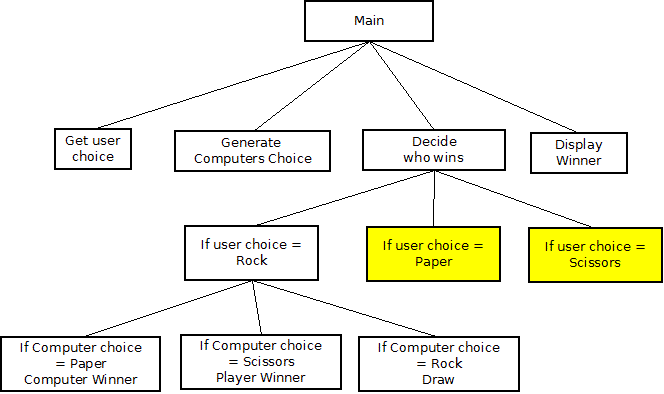
We started by creating a structure diagram for most of the program.

Structure Diagram
Can you complete the diagram above?

We then started to create the program in Python using Thonny.

BGE – HTML Lists

There are two main types of list in HTML 5, the unordered list <ul></ul>  and ordered list <ol></ol>. Lists use list items <il></li> to seperate out the items in the list.

<!doctype html>
<html>

 <head>
  <title> Page 1 </title>
 </head>

 <body>
  <h1>Lists in HTML</h1>

  <ul>
   <li>Item</li>
   <li>Item</li>
  </ul>
  
  <ol>
   <li>Item 1</li>
   <li>Item 2</li>
  </ol>
 </body>
</html>

You will notice that <ul> and <ol> are not inside paragraphs <p&gt tags.

BGE – Images on websites

The <img> tag is used to add an image to a webpage. <img> uses attributes to descibe the image and its location.


<img src="egg.jpg" alt="A picture of a chocolate egg">

  • src – The value of this attribute is the full name of the image file, in this case egg.gif which is in the same directory as the html file.
  • alt – The value of this attribute is a description of the image. This is used in case the image fails to download or it can be read aloud by screen readers.

BGE – Headings, Paragraphs and Breaks


<!doctype html>
<html>
<head>
<title>Mr. Stratton's Page</title>
</head>
<body>
<h1>Mr Stratton </h1>

<p>Age<br>
School<br>
Hobbies</p>
</body>
</html>

  • <h1> </h1> – Heading tag is used to signify a heading of type 1. The default style for this has it as the most important and therefore largest heading size with a leading and trailing line break (blank line).
  • <p></p> – Paragraph tag is used so show a paragraph of text. The default style for this has a line break appear after the text.
  • <br> – Break tag is used to insert a line break (new line).

BGE – Blank HTML Page

Open notepad++ and enter the code below.


<!doctype html>
<html>
  <head>
    <meta charset="UTF-8">
    <title> </title>
  </head>
  <body>

  </body>
</html>

Save this as blank.html in your web folder.

  • <!doctype html> – This identifies the page as a HTML5 document.
  • <html></html> – The contents of this tag is HTML.
  • <head></head> – This is the head area of the website, the contents are not displayed on the site but can be used by the browser.
  • <meta charset=”UTF-8″> – This sets the character set of the site to unicode.
  • <title></title> – Title tag contains the text that appears as the title of the site, this is displayed at the top of the windows or on the tag.
  • <body></body> – The contents of this tag can be displayed on the browser window.

Notice that tags can contain other tags in thier contents, so for example the <head> contains <title>.