
This guide shows you how to bring learner’s digital drawings into the playroom or classroom using augmented reality technology. Boost your learner’s creativity, storytelling and digital skills with this activity that is just magic!
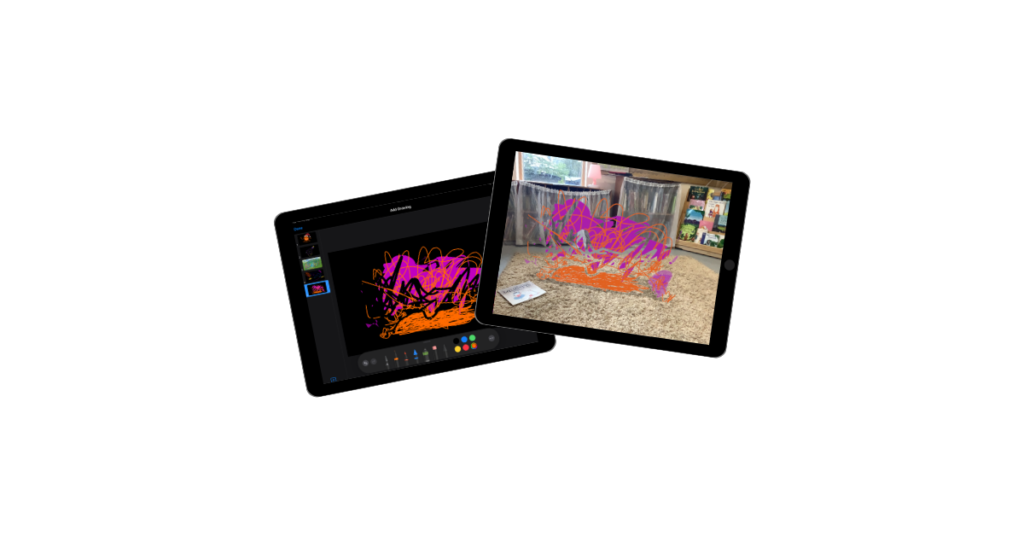
This guide shows you how to bring learner’s digital drawings into the playroom or classroom using augmented reality technology. Boost your learner’s creativity, storytelling and digital skills with this activity that is just magic!
AR Makr, the creative toolbox for Augmented Reality. Bring your drawings and photos to life in the real world.
AR Makr is an app that lets learners create virtual objects and place them into the world around them using the iPad camera. Pupils can “scan” a 2D drawing they have made on paper or in another app and transform it into a 3D virtual object that they can walk around, resize, and even animate within their own classroom.
From 2D to 3D: It helps pupils understand spatial awareness by taking flat images and placing them in a 3D environment.
Storytelling in the Real World: Pupils can build “AR Scenes” for example placing characters from a story onto their school playing field to film a digital retelling of a story.
Interactive Models: It allows for the creation of virtual museums or science models (like the solar system) that pupils can interact with without needing physical materials.
Built-in Recording: The app has a simple “Record” button, allowing pupils to film their AR creations and narrate their learning as they move around their virtual objects.
Launch: Open the AR Makr app and tap ‘Start’.
Surface Scan: Move the iPad slowly to let the camera “find” a flat surface (like a desk or the floor). You will see a grid appear when it’s ready.
Create an Object: Tap ‘New’ to either draw something directly with your finger, or tap the folder icon to import a photo or a drawing from your Photos library.
Place: Once your object is ready, aim the circle at the grid on your desk and tap ‘Place’. You can now use your fingers to pinch and zoom to resize it.
Record: Tap the camera icon on the side to take a photo of your scene, or hold the record button to capture a video of your virtual world in action.
Retelling Fairy Tales: Pupils can draw the “Three Little Pigs” on paper. They use the camera to “scan” the pigs and their houses into AR Makr, then place them on the classroom floor to film a puppet show where they provide the voices.
Shape & Measure: Use the built-in 3D shapes in AR Makr to build a virtual tower. Pupils can use their fingers to stack cubes and spheres, discussing the properties of the shapes as they build.
The Solar System: Pupils can create or import images of the planets. They can place the “Sun” in the centre of the classroom and position the planets at relative distances, walking between them to understand the scale of space.
Virtual Timelines: Create a “Walking Timeline.” Place images of historical events in a line across the hall. As the pupil walks along the line, they film themselves explaining each event in chronological order.
Digital Galleries: Pupils can take photos of their physical paintings or drawings and “hang” them on the virtual walls of the classroom, creating a digital art gallery that parents or peers can walk through using the iPad.
Create your own Augmented Reality Snowstorm in AR Makr | iPad
Digital scavenger hunts can be a great way to familiarise learners with using technology for learning. Find out how to make your own or download our premade templates!

Some people find finding their downloads tricky. This is a quick guide on how to download to your iPad.