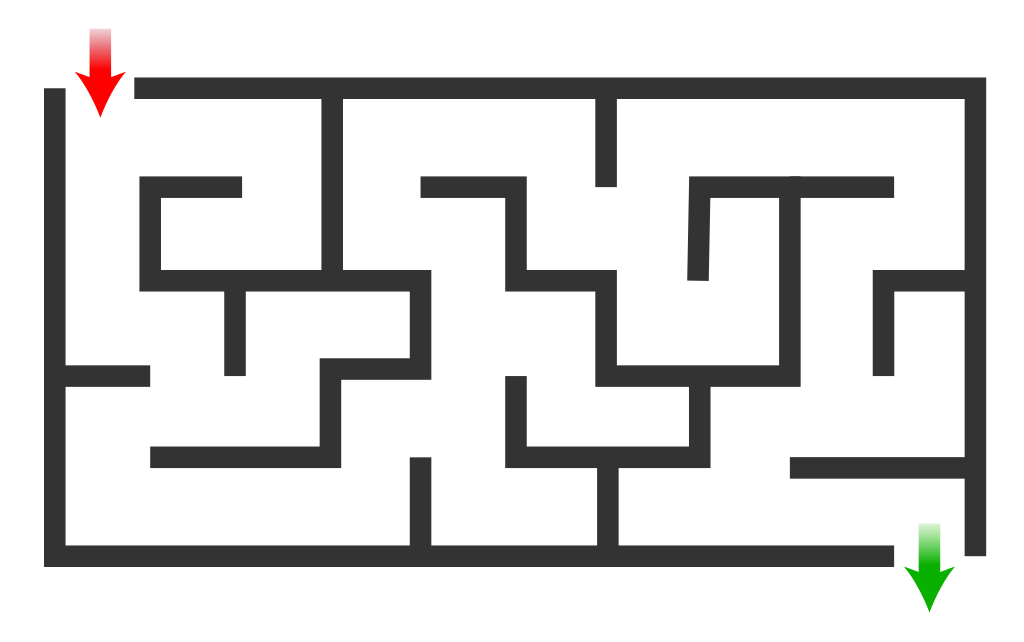
This weeks task is to solve the maze. You are not allowed to touch the black lines.
You can use any Python Turtle commands you want including
goto(x,y)
right(deg)
left(deg)
forward(length)
Save the image as maze.png and use the boilerplate code below in Thonny to start the task.
# Solve the maze
# Mr Stratton
# 7/6/19

from turtle import *
# Help here https://docs.python.org/3/library/turtle.html
setup(1000,600) # set the window size to 480x360 pixels
bgcolor('yellow') # set BG to yellow
bgpic("maze.png") # BG pic only works with PNG and GIF
title("Mr. Stratton's Maze Tutorial") # Title of window
color("red") # Colour line
# shape("arrow") # Shape of the turtle (“arrow”, “turtle”, “circle”, “square”, “triangle”, “classic”)
turtlesize(3) # size of turtle (easier for some kids to see)
pensize(3) # Set the size of the pen

penup()
goto(-420,220)
pendown()
# vvvvvv Enter your code below here vvvvvv
After you have solved the maze answer these questions:
How many programming steps did you take?
Can you reduce the number of steps?
Save a new copy of the program and edit it to make it more efficient (fewer lines). The number of extra lines that my program needed is below.
A firewall protects against suspicious access to a computer from a network. When an external computer tries to access a computer, the firewall decides if the external computers access should be granted or denied.
Describe the use made of encryption in electronic communications.
Encryption encodes the information so that if it is intercepted then they would not be able to make sense of it. It can only be understood by the sender and received.
Describe the purpose of the basic computer architecture components and how they are linked together:
Processor
Control Unit – controls the sequencing of fetching, decoding and executing instructions.
Arithmetic Logic Unit – performs all calculations and logical operations
Registers – temporary memory locations within the processor.
Memory locations with unique addresses
All memory locations within RAM is given a unique address so that the computer can read and write data to that location correctly.
Buses
Buses are used to move data around as binary inside the computer system
Address Bus – this transfers the memory location that is going to read from or written to.
Data Bus – this transfers the data between the processor and memory, and vice-versa.
Explain the need for interpreters and compilers to translate high-level program code to binary.
Computers can only understand binary and therefore all instructions must be translated into binary before they can be executed.
Interpreter – translates one program line into machine code and executes immediately. Machine code is not retained, so must be translated each time, the Interpreter must therefore be resident in memory.
Good for testing, errors are highlighted straight away.
Compiler – All lines are translate to machine code, this machine code version is then saved and can be executed. Machine code can be run again, and again without further translation.
Describe and exemplify the use of binary to represent positive integers.
Convert from binary to denary and vice-versa.
An integer is a whole number.
Binary is how a computer system stores data. Everything stored by a computer is stored using
A Binary Digit (bit) is either a 0 or a 1
37 =
128
64
32
16
8
4
2
1
0
0
1
0
0
1
0
1
Add the column headers where there is a 1 to go from binary to decimal so the example above is 32+4+1=37
Describe floating point representation of positive real numbers using the terms mantissa and exponent.
Floating point representation is for storing a number with a decimal point.
The mantissa and exponent are stored as separate numbers within the computer’s memory. The computer recreates the number for calculations when it needs to.
For the number 0.10111 x 21011 Mantissa =10111 Exponent=1011
Describe extended ASCII code (8-bit) used to represent characters.
Each character is given an 8-bit ASCII Code, this is a binary number.
For example – V = 86 = 01010110
Describe the vector graphics method of graphic representation for common objects:
Vector graphics are made up of objects. Each objects is described by attributes – e.g. the instructions to draw the shape.
Rectangle – (height, width, x, y, fill colour, line colour)
Ellipse – (cx, cy, rx, ry, fill colour, line colour)
Line – (x1, y1, x2, y2, line colour)
Polygon – any shape with 3 of more sides – (x1, y1, x2, y2, x3, y3, fill colour, line colour)
Describe the bit-mapped method of graphics representation.
Computers stores, in binary, each pixel. The greater the number of pixel the greater the resolution and file size of the image. Number of bits per pixel depends on the number of colours in the image – more colours, more bits.
Describe the energy use of computer systems, the implications on the environment
It is estimated that two billion computer systems are in use in the world – these all use energy. As user we need to consider how to reduce unnecessary energy use.
and how these could be reduced through:
Settings on monitors – reduce brightness, activate efficiency mode, use energy efficient monitors.
Power down settings – power-down after a period of inactivity, control setting for single components.
Leaving computers on standby – power consumption is reduced but it still uses some power, machines should be shut down when not in use.
The count occurrences algorithm is very similar to the linear search v1. However, it includes an incrementing counter keep track of how many items it finds.
def countOcc(target,numbers):
    #Count the number of times target is found in numbers
    count=0
    for number in numbers:
        if number==target:
            count=count+1
    return count
You will notice that I have used a FOR EACH in this example as there is no requirement to track the position of the elements. This algorithm can also be used to count how many numbers are above or below a target value by simply changing the operator in the IF statment.
We spent a lot of last week on Standard Algorithms, most of them have the structure of an IF inside a FOR loop. While it is possible to use a FOR EACH loop this would mean that we could not know what the position was of the value we were searching for. In the examples below the returned value (max or min) could be changed to the position to allow this to be used elsewhere in the program.
To find the largest number in an array we would use the “Find Maximum” algorithm
def findMax(numbers):
    # Find biggest number
    max=numbers[0]
    for counter in range(1,len(numbers)):
        if numbers[counter]>max:
            max=numbers[counter]
            #position=counter
    return max
To find the smallest number in an array we would use the “Find Minimum” algorithm
def findMin(numbers):
    #Find smallest number
    min=numbers[0]
    for counter in range(1,len(numbers)):
        if numbers[counter]<min:
            min=numbers[counter]
            #position=counter
    return min
Notice that both of these functions are very similar with only the operator changing. Did you also notice that the for loop starts from index 1? Why do you think this is?
A linear search is used to check if a value is in an array. There are two ways of doing this:-
Check every value in the list, even if you find the value immediatly.
def linSearchV1(target,numbers):
    #Search for target in all of the numbers
    found=False
    for counter in range(len(numbers)):
        if numbers[counter]==target:
            found=True
    return found
Check until you find the value you are looking for, this is much more effient and can on average half the ammount of time taken for the program to run.
def linSearchV2(target,numbers):
    #Search for the target numbers until it is found
    counter=0
    found=False
    while not found and counter!=len(numbers):
        if numbers[counter]==target:
            found=True
        else:
            counter=counter+1
    return found
The same algorithms can be used to find a string in an array of strings or a character in a string.