Category: Idea

Festive Digital Activities for Learners

The festive season is here, bringing with it a wonderful opportunity to blend seasonal cheer with engaging digital learning opportunities. Whether you’re looking for activities which build digital creativity, seasonal STEM challenges, or fun ways to practice digital skills, this guide gathers a sleigh-full of festive activities from DigiLearnFalk, Connected Falkirk and our friends designed to spark joy and curiosity in learners of all ages. Get ready to wrap up the year with some digital learning fun!

Local Resources

Our home grown Falkirk festive resources designed to be used with 1:1 and Shared iPads.

Creative Activities for Learners Festive Edition II

The latest edition of our Creative Activities for Leaners which focuses on festive fun. (Pssst…Edition I is still available here, as is the YouTube playlist for Edition 1 which can be found here).

Festive Activities for Early and First Level

This free downloadable Keynote contains seven festive activities for early and first level learners. Explore creativity, coding and games which all help to build familiarity with iPad as well as build digital skills and confidence. 

You can preview a PDF version of the Keynote below, for best results and access to all activities (including voice instructions to support pre-readers) within the one document please download the Keynote file from our Box folder here. Find out more details about our festive activities for early and first level learners here.

Codemas

Three coding themed challenges to celebrate the festive season and boost STEM learning.

Other Resources

Festive resources for 2026 from our friends and partners. Please note, some of these activities use text-to-image AI, all Falkirk Council Education employees using or thinking of using AI in the classroom must familiarise themselves with the AI in Education: Guiding Principles and Support page.

Adobe Express 12 Days of Creativity

Twelve joyful, low-prep Adobe Express activities to celebrate learning and wrap up the year with creativity and cheer. Whether you unwrap one activity each day or all 12 at once, getting started is easy: Pick an activity.

All learners and teachers in Falkirk have access to Adobe Express via Glow. For more information on this and how to log in visit this page.

To access the 12 Days of Creativity challenges:

  • iPad users log into Adobe Express app as usual and the activities will appear on the main home page
  • Desktop users can click this link: adobe.ly/12DOC25

Find out more directly from Adobe Express here or browse the activities below.

Day 1: Design an ugly sweater

Skills: Gen AI Styles + Background Swapping

Day 2: Design Your Very Own Stuffie

Skills: Generate Image, Background Swapping, Image Effects

Day 3: Design a One-Word Wallpaper

Skills: Text Effects, Background Swapping

Day 4: Transform Yourself Into a Dancing Elf

Skills: Photo Upload, Crop, Wobble-loop Animation

Day 5: Animate a Funky Snack

Skills: Animation, Layered Elements, GIF Export

Day 6: Send a Vintage Postcard

Skills: Text Effects, Layering

Day 7: Record a News Story From Future You

Skills: Gen AI Styles + Background Swapping

Day 8: Assemble a Talking Snowman

Skills: Generate Image, Background Swapping, Image Effects

Day 9: Sugarcoat Your Favourite Animal

Skills: Text Effects, Background Swapping

Day 10: Construct a Personalized Snow Globe

Skills: Multi-Layer Video Editing, Animation

Day 11: Personalize a Time Capsule

Skills: Video and Music Editing

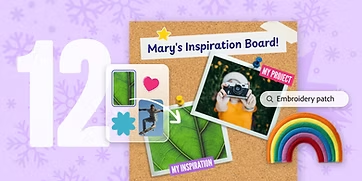
Day 12: Curate an Inspiration Board

Skills: Layering, Image Effects, Text Effects

Glow Adobe Express Christmas Tree Challenge

Glow are running an Adobe Express Christmas Tree Challenge! The challenge is to use the powerful tools in Adobe Express for Education to design and create a unique Christmas tree. Find out more here. 

Case Study: Improving Writing with Digital Technologies

This case study looks at how class teacher Ciara Hutton at St Francis Xavier’s RC Primary School explored the impact of integrating digital technology into primary school writing lessons. By allowing three students with varying writing challenges to type their work, the Ciara observed significant improvements in confidence, writing quality, and engagement. This successful intervention has led to the wider implementation of digital tools within her classes and has been shared with the wider school supported by Pupil Digital Leaders.

Context

“My main goal was to improve attainment in writing by introducing digital technology. I had a class of 33 pupils in the upper school and I found that they did not feel confident in their writing. I selected three pupils who did not have any specific learning needs but did require some support with writing. One learner found concentrating at a table with others difficult, another found handwriting challenging and one struggled to write quickly for long periods of time. We are not a 1:1 device class so I decided to use a combination of class PCs and our shared Connected Falkirk iPads to give the pupils the opportunity to type their writing. This was to not only build confidence but remove any literacy barriers from their ability to succeed in writing.”

What did you do?

“I had a rota which rotated the devices used by the pupils over the course of four weeks. They would type directly on to Word and then save these on a OneNote, which was shared with myself and someone at home. Pupils did require some training at first on how to edit and save their work but they were confident with this by week 2.

During this time I collected my findings in 3 different ways, though a baseline questionnaire, a Leuven Scale and document analysis. The questionnaire was to uncover learners’ attitudes to writing and their confidence with the subject. The Leuven Scale was to determine if they were more focussed when given the device.

Finally I conducted a document analysis to see if there was improvement in learner work. After the four week period, I decided the whole class would benefit from the opportunity to write on a device and so I created a randomiser wheel in which pupils would be selected and all pupils would be given the chance to type by the end of the year. This allowed me to see the writing ability in the class as a whole and offer the opportunity to engage with digital devices for writing to all learners.”

Learners used Word to write. Word Online is available to all Falkirk Council learners through their Glow account. 

OneNote and OneNote Class Notebook are also available to all learners through Glow.

What was the impact?

“Overall, I saw a large increase in learners’ confidence and understanding of writing. Learners could see the increase in the quality and quantity of their writing, as they could see the progress from week 1 to week 4.

When pupils then returned to writing in their jotters, the skills they had gained had transferred. They were more confident with editing and reading their writing and they were writing similar amounts to week 1.

The questionnaire found that children felt more confident in their work and enjoyed the ability to do further research while writing. The Leuven Scale showed that pupils enjoyed the opportunity to write in a different way and focussed more as a result. The document analysis showed an increase for all 3 children in the length of their writing and the clarity on what they were saying. We did have to discuss the risks of plagiarism and how all ideas must be their own. However this was a useful opportunity to inform all pupils about this.

The findings suggest that the use of digital technology can improve attainment in writing. Although time still needed to be given for handwriting, introducing typing as a form of writing allowed pupils to focus their time on creative writing skills. I also found my ability to mark and give specific writing feedback improved, as I could clearly see their successes and areas of improvement.”

Pupil Voice

My baseline questionnaire had stated that the learners found writing “hard and bad”, whereas the final questionnaire stated that they thought that writing could be “exciting” and they were “able to use imagination more.”

The Leuven Scale which showed an increase in pupil overall, with the only decreases being due to some issues with using the new technology at first. Overall their focus and enjoyment increased through the four week period.

Where next?

“The immediate next steps I took were to offer all pupils one opportunity a year to write using digital technology. This allowed me to assess their writing ability without literacy barriers and for learners to see their progress clearly. I also continued to assess and monitor the three pupils within the focus group to see if they were able to transfer and maintain the skills they had gained during this practitioner enquiry. I found that they were able to transfer back to their writing jotters and had more confidence with their writing.

Since this practitioner enquiry, I have begun teaching another class and I have used this approach straight away. I have used a randomizer wheel so that all pupils have had the opportunity to use these tools, and not just those with specific learning needs. I have also trained the Digital Leaders within the school to be able to support other learners with writing on Word and uploading documents to One Note, so that other teachers may try this approach in their own class.”