Tag: Midweek Byte

Midweek Byte Week Commencing 7 September

Week Commencing 7th September

Read&Write

There’s still time to book one of our Read&Write Professional Learning sessions on CPD Manager. Both courses are being held at Cochrane Castle Primary School:

1 October – Supporting Every Learner with Read&Write using iPads, Course ID: 95776

6 October – Supporting Every Learner with Read&Write using Google Chrome or Microsoft Edge, Course ID: 95778


Accessibility Staff Toolkit

🧰Have you checked out our Staff Toolkits on the new DigiLearnRen? We have created these toolkits as how-to-guides to get you going. There is no expectation that you work your way through them all, rather it is a pick and mix selection that allows you to choose what you need, when you need it.

They are broken down into the main tools available through Glow. So, if you decided that you wanted to know more about the AI tools available in Glow, you could either sign up for our AI Champion courses, Watch Again our AI videos from our sessions run in partnership with Education Scotland or work through our Staff Toolkit.

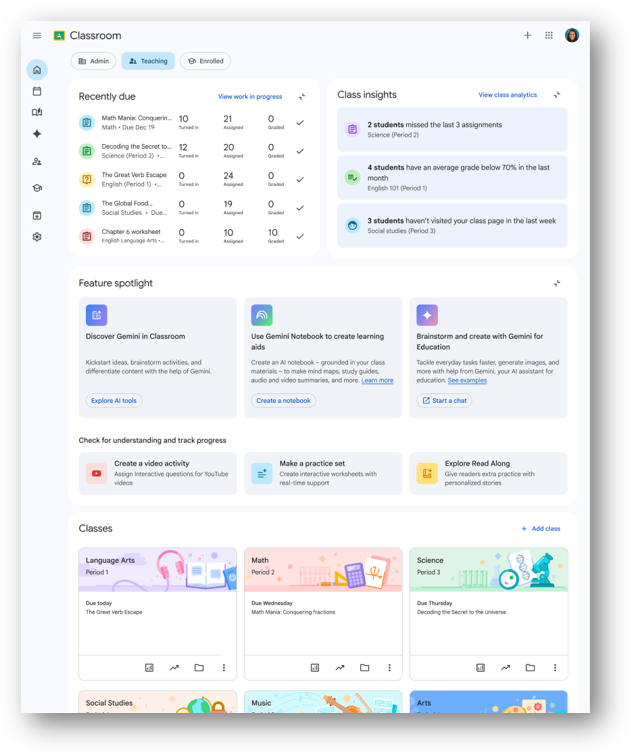
If you are new to the Google tools, there is a Google Staff Toolkit with a host of helpful resources on using Gemini and Notebook.

Or if you want to learn more about Read&Write our authority subscription accessibility tool, click on the Accessibility Toolkit and then Read&Write to find out all about it – including how to use it in exam mode.


Immersive Learning Mobile View with ThingLink

If you haven’t claimed your authority ThingLink seat to allow you to create interactive content – either for use with learners or for learners to create their own – please use the contact form to reach out. There are a host of different ways to use ThingLink with some brilliant ideas to get you started available on their blog. This post is all about using ThingLink mobile view: https://www.thinglink.com/blog/immersive-learning-in-your-hands-introducing-mobile-view-for-thinglink/

Toolkit for Reflecting on Digital and AI Technologies in L&T

Monday 14 September, 9.30 – 11.30 am online

The event marks the launch of a new open-access resource designed to support critical, evidence-informed reflection on the use of digital and AI technologies in education, and to hear how the research team and educational partners will using it in practice this academic year.

The team at the School of Education, University of Glasgow has developed the Toolkit for Reflecting on the Use of Digital and Artificial Intelligence (AI) Technologies in Learning and Teaching. Rather than promoting specific technologies or offering a compliance checklist, the toolkit encourages structured reflection, professional dialogue, and enquiry through self-assessment activities, real-world case studies, and guided reflective frameworks. It supports reflection across a range of dimensions of technology use and can be used individually or collaboratively, with flexibility to adapt to the needs and realities of different educational settings.

At this launch event, we will introduce the toolkit and explore how it can be used in practice. We will share more information about the design process of the tool and where we are heading with our current piloting of the resource in different contexts across Scotland. The event will also provide opportunities for discussion, questions, and feedback, allowing participants to contribute to conversations about the future development of the toolkit and related professional learning resources. The toolkit and associated pilot work are supported through Scaling Educational and Policy Impact through Co-designed Digital and AI Professional Learning and Educational Resources (SCOPED), a project funded through the ESRC Impact Acceleration Account at the University of Glasgow. The launch event marks the starting point for SCOPED’s knowledge exchange and dissemination activities and provides an opportunity to share emerging insights with educators, researchers, policymakers, and other stakeholders.

Anyone with an interest in the thoughtful, critical, and evidence-informed use of digital and AI technologies in education is warmly invited to attend. This includes educators, teacher educators, school and college leaders, professional learning facilitators, researchers, policymakers, and others interested in the educational implications of emerging technologies. Whether you are new to the toolkit or already exploring its use in your own setting, we would be delighted to welcome you.

Attendance is free. Places for the in-person event are limited and will be allocated on a first-come, first-served basis. Online attendance is also available.

Book your place here: Launch Event: Toolkit for Reflecting on Digital and AI Technologies in L&T Tickets, Monday, September 14  •  9:30 AM – 11:30 AM | Eventbrite

Access the toolkit here: https://eprints.gla.ac.uk/366744/


MidWeek Byte Week Commencing 31st August

Week Commencing 31st August

Accessibility!

September is accessibility month in Renfrewshire!

Read&Write

We recently ran a session on Read&Write for a group of staff. The session slides contain a wealth of follow up resources for staff and pupils, including a full training video for each platform. These should fully support anyone wanting to revise certain tools.

The slides can be accessed here. Please feel free to share as widely as you see fit.

We have 2 new Professional Learning courses on Read&Write available to book via CPD Manager. Both courses are face-to-face sessions. Supporting Every Learner with Read&Write using iPads, Course ID: 95776 on 1 October and Supporting Every Learner with Read&Write using Google Chrome or Microsoft Edge, Course ID: 95778 on 6 October.


ThingLink Integration with Adobe Express

Check out this interesting article on how easy it is to integrate your Adobe Express content into ThingLink:

https://www.thinglink.com/blog/how-to-create-immersive-learning-with-adobe-express-and-thinglink/

If you have never used ThingLink before and are interested in getting a Renfrewshire “seat”, please reach out via our contact us page and we will get you sorted. If you are a visual person, you can watch our ThingLink Professional Learning videos here and here.

We hope to have further PL on ThingLink coming soon so please keep checking our PL calendar and CPD Manager for details.


Canva

Last week we said that Canva is now available in Glow and you can access this via a tile on your LaunchPad. We have now added on the Canva Professional Learning on offer via Education Scotland to our Professional Learning calendar so check out the dates by scrolling to the bottom of this page to book and get your self going with Canva!

https://blogs.glowscotland.org.uk/re/digilearnrenfrewshire/professionallearning/


Glow Security Improvements

As part of Education Scotland’s ongoing review of Glow account security and access management, they will be removing certain administrative privileges from Glow accounts that have not logged on in the last 18 months.

The following privileges will be removed from inactive accounts:

  • RM Unify Admin
  • RM Password Admin
  • RM Launchpad Admin

This change is intended to ensure that administrative access is limited to active users who continue to require these permissions as part of their role.

If you still require any of the above privileges following the removal, please reach out to csbit@renfrewshire.gov.uk who will be able to assist.


Midweek Byte 26th August

Week Commencing 24th August

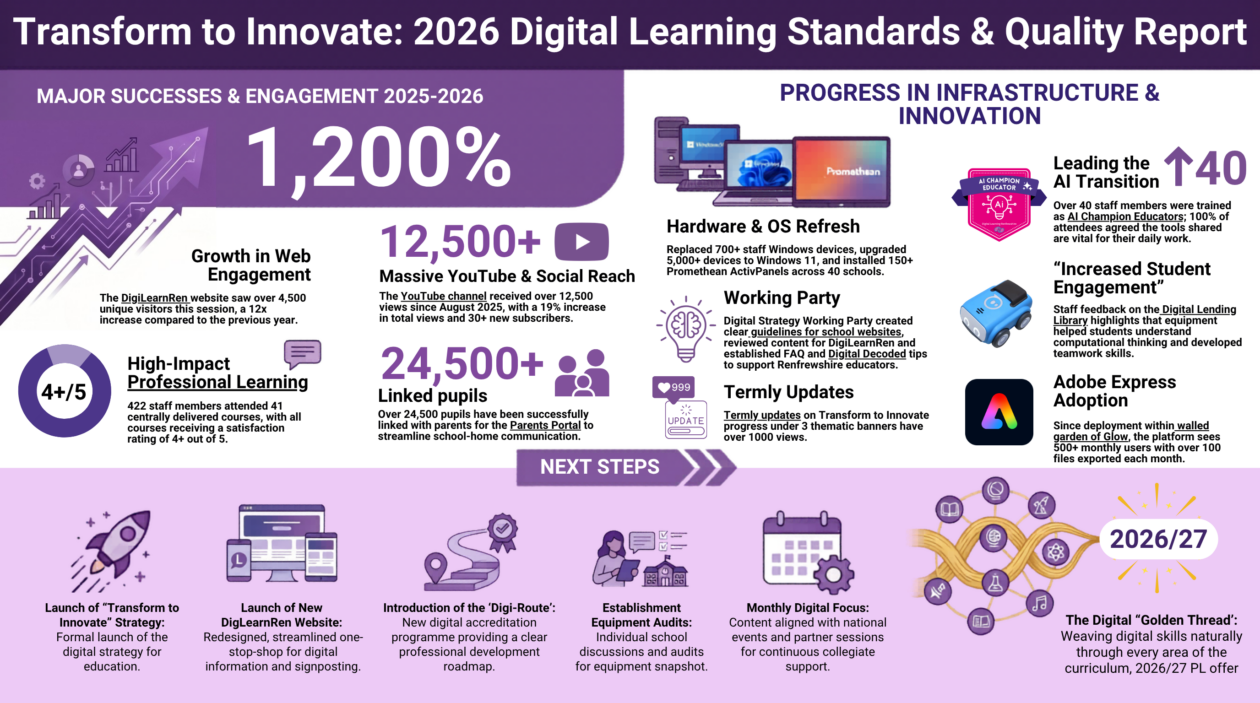
S&Q Report

Here is the Standards and Quality Report for 25/26. Click on the image to access all the links.

Glow Updates

Canva is now available!

For everything you need to know about Canva in Glow, check out our handy guide available here!

🔑Glow Password Reset

The pupil password reset took place on 11th August and Staff passwords change on 25th August. Staff will be prompted to change their password the next time they log on.

Back to School with Glow

Check out this handy guide from Glow Connect for all you need to know about Glow! Back to School August 2026.

🔐Phase 3 Security Updates: Auto blocking of network traffic from out with the UK

Glow have now rolled out Phase 3 of their security changes.

What’s changing?

They have rolled out a security change within Glow that will block Glow users from accessing Glow from identified high risk countries.

Timeline for this change

RM have now enabled this change.

Why are they blocking network traffic from some countries?

They heard at Cyber UK earlier this month how increases in geo-political tensions are changing the landscape, and that cyber is now a fundamental part of modern warfare, we also heard how AI is accelerating the pace of disruption.

It’s critical that they respond to the changing landscape and the increasing threat. Standing still is no longer an option. They’ve been looking for some time at ways in which they can strengthen the safety of Glow for all users and one of those ways is to block internet traffic from some high risk nation states.

What countries will be blocked from accessing Glow?

China, Iran, Iraq, North Korea, Ukraine and Russia.

How will this impact Glow users?

If a Glow user tries to access Glow from one of the identified blocked countries, they will be presented with the error message below.

This means that Glow users will need to be aware of this change before travelling and assuming they will be able to access Glow.

VPN User experience

They are aware that some users use VPNs to access Glow so again, this may impact if the VPN appears to come from one of the blocked countries.

Additional information

Please note that they will be regularly reviewing the global landscape and as a result, some countries may be added to the list, and some may be removed.

Midweek Byte 19 August 2026

Week Commencing 17th August

👍🏻Welcome Back

We hope you all had a great summer break. This session we will be posting our Midweek Bytes every Wednesday to keep you up-to-date with all the latest digital news so keep checking every week!

🔑Glow Password Reset

The pupil password reset took place on 11th August so if they arrive in class and haven’t logged on, remind them to choose 3 random words. Glow Connect have a useful post to help with this.

Administrators are able to bulk set passwords for students for whole groups/classes. In previous years this meant the whole class would have the same, potentially very insecure password as the admin setting could override any password controls resulting in (for example) a class all having the password “1234”.

This year, to close this loophole, Glow have instigated a process whereby users will be forced to change their password on first login to something known only to themselves, and which must comply with password strength rules.

Remember Staff passwords change on 25th August.

🏫Upcoming Professional Learning

All our Professional Learning (PL) can be found in our PL Calendar which is available here. In addition, our Learning Loop allows you to see what key PL is coming up in Term 1.

There is still time to sign up for our PL Network if you are interested in applying for the Digital School Award, Course ID: 94473 or Digital Wellbeing Award, Course ID: 94474. If becoming an AI Champion is something you are interested in, sign up for our AI series, Course ID: 94446 – you have until 26 August!

Google in Glow

Renfrewshire has its own Google Tenancy within Glow. You can access this from your Launch Pad by clicking on the Google Drive tile or if you can’t see it, click on App Library and add it from there.  This will automatically sign you into the Google tenancy where you can access all the great Google tools like Drive, Docs, Google Gemini and Notebook. If you want to access your Google account from the browser, when you sign in remember that the first part of the account is your Glow username then @re.glow.scot Why not check out our useful Staff Toolkit for Google to learn more?