Category: waiting

Digital Literacy Series 2024

Digital Literacy Series

DigiLearnScot home

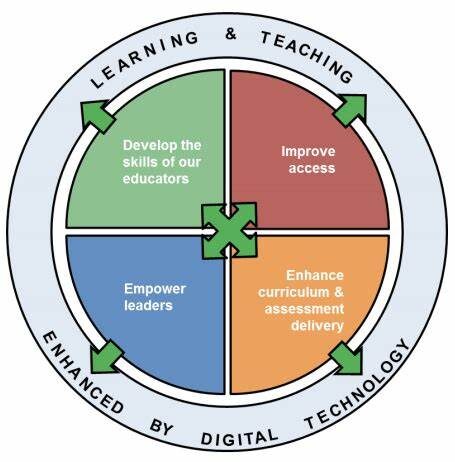
This section contains a series of three documents designed to support educators in delivering the Scottish Government Digital Learning and Teaching Strategy (2016). The three documents detail:

  • the digital skills and knowledge that teachers require for their workplace
  • the skills and knowledge that learners require, with contexts and examples for teaching them
  • guidance on how teachers might apply their digital skills to enhance aspects of learning and teaching, such as delivery and assessment

digital learning teaching strategy Scottish Government

YouTube player

- The teacher toolkit documents provide guidance on the skills and knowledge that teachers should have to meet GTCS standards for registration. The skills are organised into three levels: Essential skills that are required by every…
- The support document aims to make clear the digital knowledge and skills that learners require to be digitally competent. Being digitally competent means being able to use the most common devices and apps. It is…
- This document aims to support educators in evaluating their use of digital to enhance learning and teaching. It takes features of How Good is Our School and exemplifies how digital can be used to enhance…


scottish computing science conference

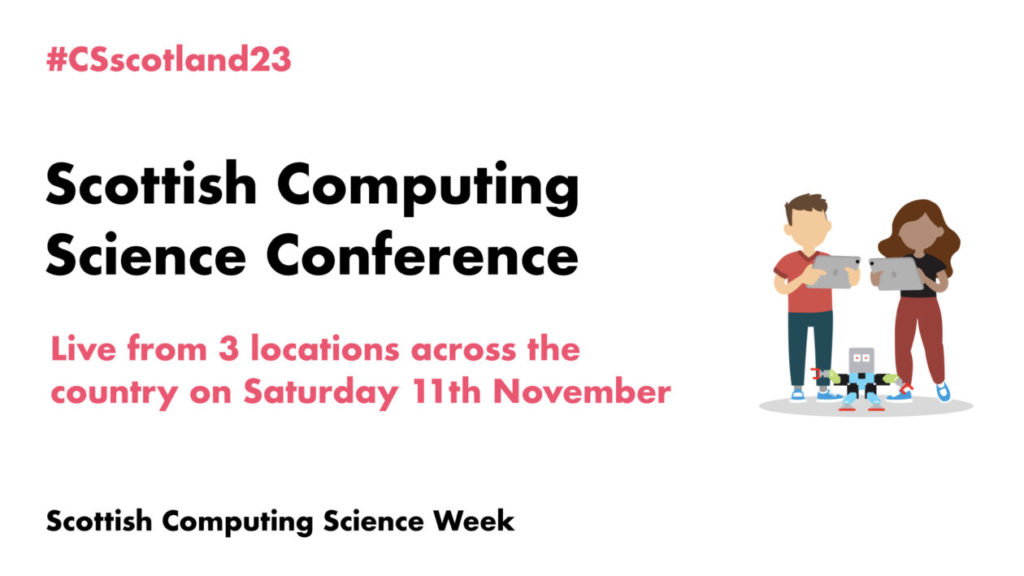
Scottish Computing Science Conference – live from 3 locations across the country! Saturday 11th November 2023

Open to all early years practitioners, primary school teachers, and secondary school teachers who teach Computing.

During this unmissable event, you will have the opportunity to hear from industry experts who will share insights into future career prospects and to attend practical breakout sessions designed to empower you with innovative teaching methods for the classroom

The conference will be held on Saturday 11th November at 10am simultaneously at the following venues;


When registering, you can choose the nearest venue to you.


The proposed agenda for the day is as follows:

  • 9:45 Arrival. Registration and refreshments
  • 10am Welcome
  • Ollie Bray Strategic Director Education Scotland – Inverness College (streamed to all venues)


  • 10:15am Keynotes
  • Karen Meechan ScotlandIS – West Lothian College/Livingston
  • tbc – West of Scotland College/Paisley
  • tbc – Inverness college


  • 11:45am Workshop Session 1


  • 12:30pm Lunch


  • 1:00pm Workshop Session 2
  • 2:15pm Workshop Session 3


  • 3pm Closing Speaker tbc


  • 3:15pm Networking Event

A Microsoft Form will be sent to you nearer the event to allow you to select the three workshops that best suit your needs from a list and to allow you to select your dietary requirements.

Use this link to sign up for your nearest event

 GET TICKETS 

Cyber resilience and internet safety: enabled or dependent

When assessing the potential risks of online behaviour, it is important to evaluate whether it is internet-dependent or internet-enabled: is the internet required for this risk or behaviour to happen?

This should be the first point of evaluating whether it is in a cyber or internet incident or a societal or safeguarding one and help you find the best support for the issue.

  go to cyber home

This is early level Digital. Spotlight on: Making Data Visible. (Live Webinars).

This is early level Digital. Spotlight on: Making Data Visible.

Via Forms and Excel within Microsoft Office.

Do you have access to Microsoft Forms and Excel within your ELC setting but are unsure how they can help you to gather, visualise and analyse data? Please join us in this 60-minute practical demo session, for beginners, where we will focus on how you can use Microsoft Forms and Excel to gather data more easily, better understand what the data you are gathering is telling you and how you can share this visually with children, colleagues and families.

In this session, we will demonstrate how to create a Forms Survey, how to view responses and how to export the results into an Excel file, where you can drill down deeper to interpret and analyse the data you have collected by exploring charts, pivot tables and slicers.

The demo session will be a take place within Glow, however you do not need a Glow log in to join this session.

*Please check with your local authority digital team or organisation lead officer for Information Security on protocols for gathering and storing data.

This session is for ELC practitioners working across a variety of settings in Scotland.

The session will be repeated 5 times throughout the year with morning and twilight options.

A Glow login NOT required to join.

Click here to select one of the morning or twilight webinar dates.

You may also be interested in This is early level Digital. Spotlight on: Practitioner Collaboration. (Live Webinars).

practitioner collab header

This is early level Digital. Spotlight on: Practitioner Collaboration. (Live Webinars).

Spotlight on: Practitioner Online Collaboration.

Do you have access to Microsoft Teams within your ELC setting but are unsure how it can help you? Please join us in the 60-minute practical demo session, for beginners, where we will focus on how you can use Microsoft Teams as your one stop digital shop with your ELC team, for organising, sharing and collaborating on content and for assisting communication. For example, you can all work together, in real time on planning documents, staffing rotas, risk assessments and shared calendars.*

You can communicate via audio calls, video calls, private chat messages and Team posts, and start conversations centred around a particular document.

You can also utilise Teams with practitioners from other settings, to support children’s transitions and to plan and work together on community events.

In this session, we will demonstrate how to create your own Staff Team and how you can use it to connect with your fellow practitioners to distribute information, communicate and work collaboratively on documents.

The demo Team you will see in the session will be a Team within Glow, however you do not need a Glow log in to join this session.

*Please check with your local authority digital team or organisation’s lead officer for Information Security on protocols for file sharing.

This session is for ELC practitioners working across a variety of settings in Scotland.

The session will be repeated 5 times throughout the year with morning and twilight options.

A Glow login NOT required to join.

Click here to select one of the morning or twilight webinar dates.

You may also be interested in This is early level Digital. Spotlight on: Making Data Visible. (Live Webinars).

ELC prac toolkit header

The Digital ELC Practitioner Toolkit – Anytime/Anywhere CLPL

The ELC Practitioner Toolkit provides an introduction to digital collaboration and communication, including support on the tools available and approaches to consider. It is a flexible ‘anytime, anywhere’ pathway allowing you to tailor your learning to your needs. There are also links to further professional learning pathways and our live webinars.

Self-directed professional learning can be included towards SSSC Continuous professional learning records for registration.

The Digital ELC Practitioner Toolkit – Anytime/Anywhere CLPL (pre recorded)

Supporting early level learners to digitally document their learning

A guided demo session to support early level learners to digitally document their learning

Create interactive, accessible learning stories with Microsoft Sway

Introducing QR codes to access learning

Productivity Suites

Microsoft Office 365 and Google Workspace are the two most commonly used platforms across Scotland that allow easier and more effective communication and collaboration between ELC staff teams. These platforms allow you to plan learning, update colleagues and attend events, at cluster, local and national levels. With more ELC practitioners working at different times throughout the day, making the most of these time saving tools can really help to improve workflow and decrease workload. 

Find out more about Microsoft Office on our YouTube Microsoft Office Playlist . Please also see the Microsoft Learn Educator Centre.

Find out more about Google Workspace on our YouTube Google Workspace Playlist. Please also see Google for Education.

If your setting/LA are Apple device users, you can find out more about Apple here on our YouTube Apple Playlist.  Please also see the Apple Education Community.


If your setting/LA are Glow users, you can find out more about Glow here, on Glow Connect.

Spotlight sessions: Improving my own Digital Literacy Skills (live webinars)

Spotlight on ELC: Practitioner Online Collaboration.

Spotlight on ELC: Making Data Visible.

ELC supporting res header

ELC supporting resources

When learning with and through technology, we pay close attention to digital literacy (living, playing and learning; consuming creating and communicating with digital technology) and computing science (exploring how technology works, how it is controlled and the problem solving concepts and approaches required) early level experiences and outcomes, within the Technologies Curriculum. 

This glossary explains the common words that are used in relation to digital literacy and computing science Digital Literacy and Computing Science Glossary.

As with literacy, numeracy and health and wellbeing, digital literacy can be placed at the heart of all learning, not only the technologies area of the curriculum.
Digital literacy outcomes can be met in any/all curriculum areas.

You may also find it helpful to explore this draft early level digital planning support document.

CfE Technologies front cover

Our National guidance for self evaluation in ELC, in Scotland is How good is our early learning and childcare?

Learning with and through digital technology is highlighted throughout the guidance and Quality Indicator 3.3 reminds us that developing creativity and digital skills are significant skills for life and learning which children should increasingly be able to demonstrate as they grow and learn. Through high quality play and learning opportunities, children begin to understand the importance of these skills and apply them to their everyday learning. 

HGIOELC front cover

​Realising the ambition: Being Me, our National practice guidance for early years in Scotland, highlights the importance of digital technology to support practitioners to meet learners needs by bringing resources and experiences virtually, when planning to support children’s interests.

Digital technologies provide opportunities for us to design unique learning spaces for the children. Bringing resources and experiences virtually into the setting can lead learning well-beyond what was originally planned.

Realising the Ambition front cover.

The Care Inspectorate have published a technology good practice guide to:  

  • highlight good practice that supports good outcomes
  • help care services, their staff and Care Inspectorate staff to achieve positive experiences of digital technology to support care
  • support care providers to better understand and offer good quality digital engagement.

Please see page 12 for an example of an ELC Case Study.

The SSSC have developed the online resource 23 Digital capabilities to support practice and learning in social and health services, to help social service workers develop their digital capabilities to support learning and practice.