The Accordion block lets you show content in collapsible sections so visitors can expand just the parts they need. It’s commonly used for FAQs, schedules, or any long page you want to make easier to scan.
from: Accordion block – Documentation – WordPress.org
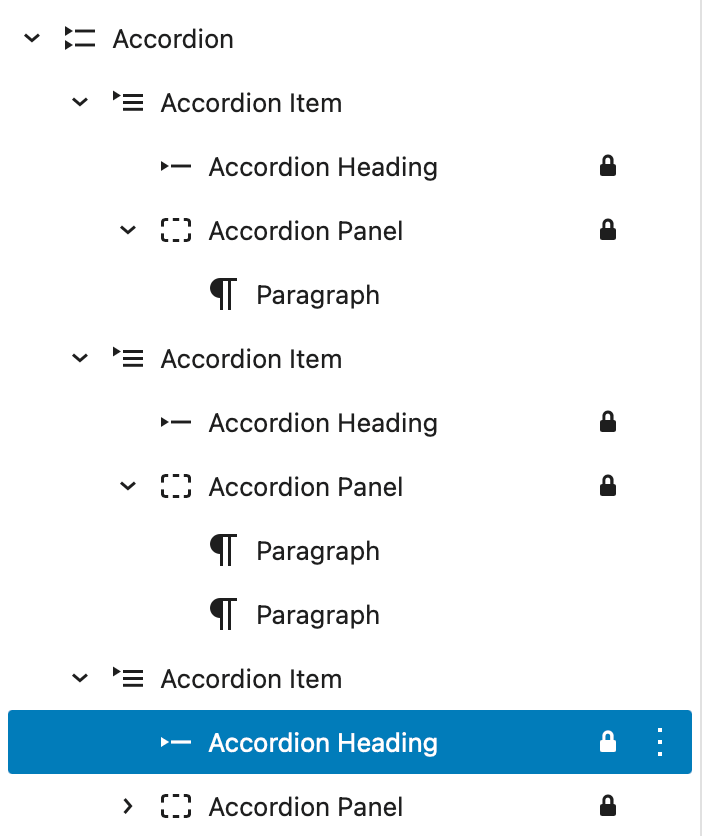
This should be a useful block to present a lot of information when viewers may want to skim down the heading. The Block consists of a series of one or more Accordion Items each of which has an Accordion Heading and an Accordion Panel. The Panel can contain other blocks, paragraphs, lists images etc.
Example Accordion
An Accordion Item can be set, like this one, to be open.
When working in an accordion, choosing Add after from the block tool bar of the Item will insert another Accordion Item. Pressing the return key while editing a block inside the Accordion Panel will insert another block in the panel.
You may find it useful to have the Document Overview open when editing an Accordion.

Leave a Reply