Join Lara Sorrell from Microsoft on Thursday 12 January at 4 pm to find out all about the built in accessibility features available in Microsoft. Book your space on CPD Manager, Course ID 80982.

Join Lara Sorrell from Microsoft on Thursday 12 January at 4 pm to find out all about the built in accessibility features available in Microsoft. Book your space on CPD Manager, Course ID 80982.

It is that time of year again when you can put all your Microsoft knowledge into action and apply to become a Microsoft Innovative Educator Expert! Check out these slides to find out what you need to do.

A great tip from Malcolm Wilson on using Microsoft Translator. Thanks @claganach for sharing. #MIEExpert.

Great news! The Reflect Wellbeing app is now available within Glow. To find out more, head to Glow Connect and see how you can start using this great tool with your learners! https://glowconnect.org.uk/reflect-well-being-app-within-teams-and-onenote/

There’s still time to apply for fabulous sessions with Microsoft and Google on the October InService. Both will focus on:
Just head to CPD Manager and book your spot!
Microsoft Course Id: 78650
Google Course Id: 78651
Handy tip on how to quickly edit a pdf document – check out our video below!
Some great new features now available in Glow with Microsoft Forms! You can now import a quiz into Forms which can save you time on creating quizzes. Why not make it self-marking when you share it with learners?
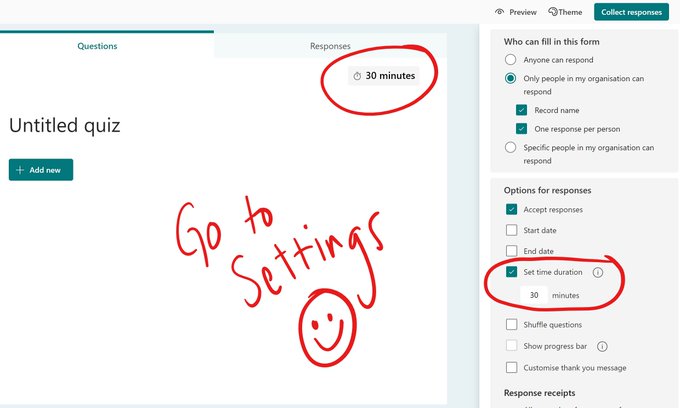
You can also now set a time limit on a quiz – great for supporting learners who need to work under timed conditions. Thanks @Sarah Clark for sharing this image to show it is found under collect responses.
These great ideas could be used during Scottish Digital Literacy Week 2022 #SDLW22 – what will you do?

Have you spotted it yet? The new Class Homepage is now available in Glow. Check out these useful guides and a great video from @mtholfsen
There is now a new feature available in Teams – Co-Organiser. This is a really helpful feature if you are sharing a class with another teacher and want to organise a meeting together. Some points to note if you have created a Team and made a pupil an owner.
The news is coming to an inbox near you! If you are a Renfrewshire new or returning MIEExpert please let us know @DigiLearnRen and we can make some local connections! Don’t forget to join #TeamMIEEScotland to learn more about #MicrosoftEdu