Author: Miss Burnett

  • Home Learning – Links and Office365

    Hello everyone!

    A big well done on a great effort today.

    Sumdog, MangaHigh and Accelerated Reader Links

    There were a few issues that cropped up. One of these was the Sumdog and MangaHigh links within Teams were not loading properly at times. To help with this I have posted buttons on the school blog. These will take you to the websites.

    Logging into Teams App

    Another common issue was when people were trying to login to the Teams app. For Glow you only need the username part of the login (eg. gw16accountpretend), for Teams you need the full email address (eg. gw16accountpretend@glow.sch.uk) so need to pop @glow.sch.uk onto the end of the username. The password is the same.

    Office 365 Download

    One thing it may be handy to know, is that all pupils are able to download Microsoft 365 (Word, PowerPoint, Excel etc.). Once they have logged into Glow and are in the Launchpad area, if they click on the wee house, this will take them to the Bishopton Primary School apps area.

    Look for this tile and it will guide you through downloading Office365 onto your device.
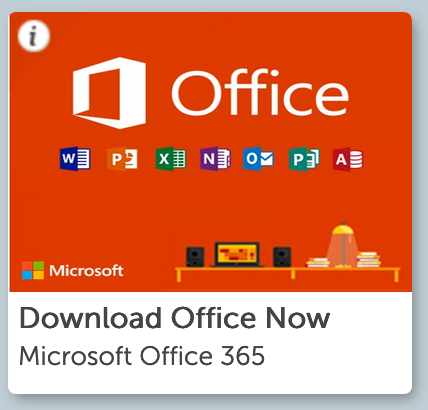
    Office is also available as an app on tablets/iPads etc. Look for this icon in your app store. As with Teams, the login details are the full Glow email address (eg. gw10surnamefirstname@glow.sch.uk and the password used to access Glow).

    Microsoft Office - Wikipedia


  • Logging into Teams App

    Image result for teams logo

    Hello everyone!

    I hope you are all doing well with your home learning today. Some people are having difficulty logging in to the Teams app using their Glow logins.

    For logging into Teams, you need to use the full Glow login and the password. eg. the login would be gw16accountpretend@glow.sch.uk (whereas for Glow you would just use the bit before the @ symbol).

    Password is just the same.

    Another thing to mention, if you have more than one user using Glow and Teams in a browser and are switching between them, they will need to logout of both Glow and Teams. They are two systems that work together but are managed in different ways. This is why some people are finding one child has logged out of Glow and someone else has signed in, Teams is still set up for the first child.

    I will pop little posts up like this as we notice any issues that are cropping up. Everyone is trying really hard today and we are making real progress in becoming experts in Glow and Teams! Well done everyone.

  • Glow/Teams – Password Problems


    Image result for glow scotland

    If you/your child are having difficulty accessing Glow with the username and password, click the picture above and complete the contact form to have details reset. This form can also be accessed in the main blog menu, underneath the Glow login button.

    Please do not add comments to this post or on the blog regarding password issues.

    (The contact form will only be monitored during school hours)

  • Accessing Glow Using XBox and PS4

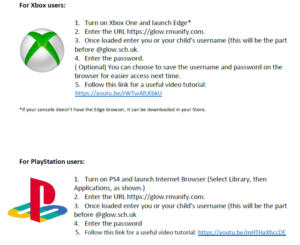
    Here are some useful videos for accessing Glow using an XBox or PS4.

  • Glow and Teams Help Page

    Image result for teams microsoft

    I have created a page to keep all of the videos on how to use Glow and Teams in one place. This can be found under the Glow button on the top right of the school site.

  • Finding Microsoft Teams

    Image result for microsoft teams

    If you are having trouble finding Microsoft Teams, please watch the video below. There is also a Teams app that can be used with your Glow username and password.

    Finding Teams

  • Microsoft Teams – Assignments

    Image result for microsoft teams

    Please click HERE to watch a video on how to complete Assignments in Microsoft Teams.

  • Glow – Using OneDrive

    Please see the video HERE to see how to access the OneDrive and create Word documents. This may come in useful when completing Teams assignments.

    Image result for microsoft onedrive

  • Glow – Password Problems

    Image result for glow scotland

    If you/your child are having difficulty accessing Glow with the username and password, click the picture above and complete the contact form to have details reset. This form can also be accessed in the main blog menu, underneath the Glow login button.

    Please do not add comments to this post or on the blog regarding password issues.

    (The contact form will only be monitored during school hours)

  • Finding Microsoft Teams

    Image result for microsoft teams

    If you are having trouble finding Microsoft Teams, please watch the video below. There is also a Teams app that can be used with your Glow username and password.

    Finding Teams

  • Farming and Agriculture Topic – Help Needed!

    This term, Primary 4 will be learning about food and the journey from farm to fork. We were wondering if there is anyone in our school community who works in this area who could come and talk to the children about farming, agriculture and the journey their food goes through before it reaches them on the dinner table.

    If you could help with this project, please complete the contact form below.

    With thanks, the P4 Teachers

    ← Back

    Thank you for your response. ✨

  • Digital Leaders 2019

    Today you watched a short video about Digital Leaders. The Digital Leaders will be trained to use different types of technology and will use their expertise to support the pupils and staff in our school community. Here is the short film you watched today:

    If you are interested in becoming a Digital Leader, application forms are available outside the P4B classroom. These must be completed and returned to Miss Burnett by Friday 20th September.


  • Parent Pay

    Parent Pay

    Below is a copy of the Parent Pay Activation Guide and newsletter.

    With thanks.

    Newsletter-Announcement-word v2

    Parent Pay – Activation Guide July 19

  • Subscribe for Updates!

    11949839291611221936the_electronic_mail_raph_01-svg-medYou can now subscribe for a daily email update for blog posts linked to your child’s class. Visit the class information page for the relevant class and then click on the subscribe links. You will be asked to enter your email address. You will then be sent a verification email to confirm your email address. If you do not respond to this you will not be successfully subscribed. Please check your junk mail folder in case the verification email has been sent there if you cannot locate it.

    If you want to receive updates from the main school blog and your child’s class blog, you will need to subscribe for the class and the main school blog updates and will receive two emails. The window for these emails arriving should be between 5 and 7pm each night with any updates from that day being sent through to your email. Please be aware that any posts added to the blog after 5pm that day will be in the update email the following day.

    Example: if you have a child in P4M and P7H you should subscribe to both classes and will receive an email for each. If you also want to receive any posts on the main school blog (general posts that apply to the whole school), please subscribe to that also.

    Please note, the email updates will come from a Google email address, however, this is not monitored by the school and any enquiries should come via the contact details provided here.

    To ensure we are reaching as many people as possible we have set up a Facebook page which will also be updated from the school blog. Search for Bishopton Primary School Renfrewshire  or click here and like and follow our page. Please note, as with all our social media channels, this will not be monitored outwith school hours and should not be used as a means of contacting the school. If you wish to contact us please do so by contacting the school office.

    With thanks!

  • EMail Subscriptions

    Please be aware that the school website is currently under construction while getting ready for the new school year. All current email subscriptions for class blogs will be stopped in the next few days and at the start of the school year you will be able to sign up to the new class email updates via the blog.

    With thanks!

  • New Phone Number

    As of tomorrow, Thursday 16th May 2019, our school phone number will be 0300 300 0147.

  • ParentPay

    Please watch the presentation below for information on ParentPay – coming soon to Bishopton Primary!

  • New Phone Number

    On 16th May 2019, our school phone number will be changing to 0300 300 0147.

    I will pop another post on the blog nearer the time too.

    Miss Burnett

  • Subscribe for Updates!

    11949839291611221936the_electronic_mail_raph_01-svg-medYou can now subscribe for a daily email update for blog posts linked to your child’s class. Visit the class information page for the relevant class and then click on the subscribe links. You will be asked to enter your email address. You will then be sent a verification email to confirm your email address. If you do not respond to this you will not be successfully subscribed. Please check your junk mail folder in case the verification email has been sent there if you cannot locate it.

    If you want to receive updates from the main school blog and your child’s class blog, you will need to subscribe for the class and the main school blog updates and will receive two emails. The window for these emails arriving should be between 5 and 7pm each night with any updates from that day being sent through to your email. Please be aware that any posts added to the blog after 5pm that day will be in the update email the following day.

    Example: if you have a child in P4M and P7H you should subscribe to both classes and will receive an email for each. If you also want to receive any posts on the main school blog (general posts that apply to the whole school), please subscribe to that also.

    Please note, the email updates will come from a Google email address, however, this is not monitored by the school and any enquiries should come via the contact details provided here.

    To ensure we are reaching as many people as possible we have set up a Facebook page which will also be updated from the school blog. Search for Bishopton Primary School Renfrewshire  or click here and like and follow our page. Please note, as with all our social media channels, this will not be monitored outwith school hours and should not be used as a means of contacting the school. If you wish to contact us please do so by contacting the school office.

    With thanks!

  • EMail Subscriptions

    Please be aware that the school website is currently under construction while getting ready for the new school year. All current email subscriptions for class blogs will be stopped in the next few days and at the start of the school year you will be able to sign up to the new class email updates via the blog.

    With thanks!

  • Blogs, Email and Twitter Issues

    Hello there

    As you may be aware we are having some issues with a delay between posts on the blogs and email updates. We have made a few changes behind the scenes that will hopefully help with this problem, however, there may be some teething issues so please bear with us as we iron them out!

    Previously, the email updates contained posts from the class you subscribed to and any posts from the main school blog. We think this is where the delay was happening. Therefore, if you want to receive updates from the main school blog and your child’s class blog, you will need to subscribe for the class and the main school blog updates and will receive two emails. The window for these emails arriving should be between 5 and 7pm each night with any updates from that day being sent through to your email. Please be aware that any posts added to the blog after 5pm that day will be in the update email the following day.

    Example: if you have a child in P4M and P7H you should subscribe to both classes and will receive an email for each. If you also want to receive any posts on the main school blog (general posts that apply to the whole school), please subscribe to that also.

    In addition we have changed the way in which our blog posts are pushed to the twitter feed. This should result in twitter being updated within a few minutes of the class teacher posting on the blog and information getting to you in a more timely manner.

    Also to ensure we are reaching as many people as possible we have set up a Facebook page which will also be updated from the school blog. Search for Bishopton Primary School Renfrewshire  or click here and like and follow our page. Please note, as with all our social media channels, this will not be monitored outwith school hours and should not be used as a means of contacting the school. If you wish to contact us please do so by contacting the school office.

    Finally we are still experiencing issues with the enquiries email address. We are hoping that this will be resolved soon. In the meantime if you have sent an email and not received a response please contact the office and we will ensure your enquiry is dealt with promptly.

    Thanks for your patience as we work to find a resolution.


  • Christmas Fair!

    Please see the pics below for information about the Christmas Fair! These letters were sent home today (Thursday) so please check bags for hard copies.

    With thanks.

    INFORMATION LETTER:

    VOLUNTEERS NEEDED:

    POSTER COMPETITION:

    CHILD HELPERS:


  • Remembrance Day Poppies

    Poppies will be available from Monday 6th November until Friday 10th November.  If you wish your child to make a donation and receive a poppy, please ensure that they have their donation separately from their snack/lunch money.

  • Photographs Reminder

    Just a reminder that Tempest Photography will be in school on Thursday 26th and Friday 27th October to take individual and family photographs.


  • FINAL WEEK! Smoothie Book

    Next week is the final week to snap up your copy of the P7S Superhero Recipe Book. All orders will close on Thursday 12th October. Please see THIS POST to place an order.

    We appreciate you supporting the P7S Build-a-Business topic!

Report a Glow concern
Cookie policy  Privacy policy