Enhancing Learning with Digital

Curiosity
Create an image or text to engage / hook / interest using Microsoft Designer or Microsoft Co-pilot. Carefully word the description to generate a stimulus for your class discussion that suits your planning and provides opportunity for learners to think deeply.
Practice and checking for understanding

Showbie
There are lots of ways to use Showbie for practice and to give feedback e.g.
- upload and answer practice in different formats – use mark up, typing or audio
- Socrative – quick questions and assignment options
OneNote
Many of our secondary schools utilise OneNote as a way to ensure lots of practice at new learning.
Like Showbie, there are many options for asking and answering – draw, type, audio, picture etc

Quizzing options
We have a plethora of options for quizzing to help check if learners can apply knowledge.
Examples include: Microsoft Forms, Socrative and Quizizz
Features of highly effective practice
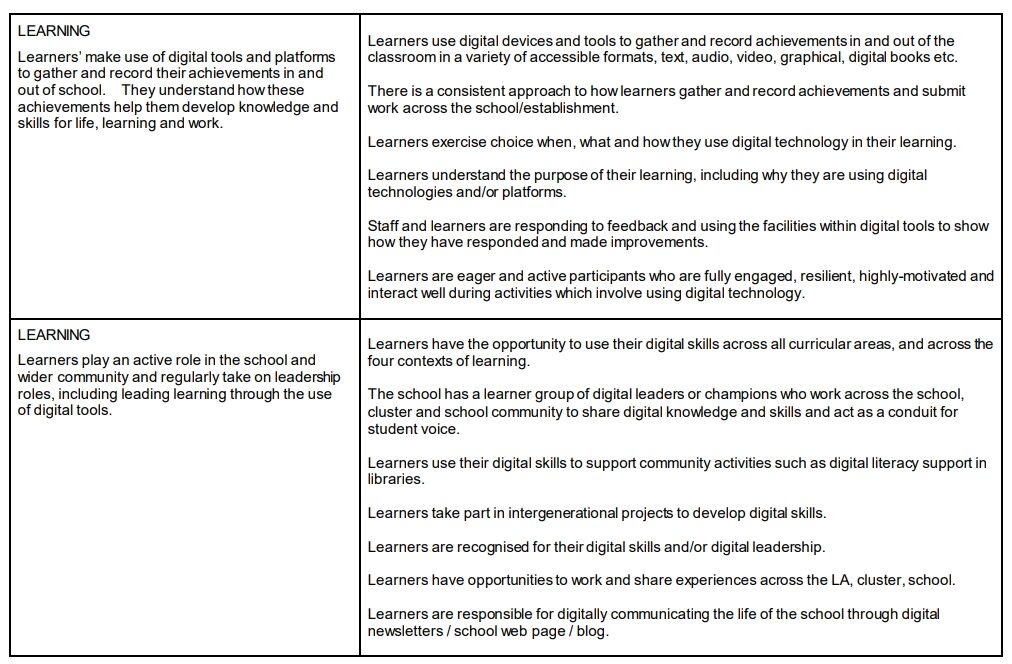
The following extracts are from the Education Scotland document ‘Features of Highly Effective Digital Learning, Teaching and Assessment in Schools’ showing a feature of practice and what this might look like in schools / classes.
Read the full document here:
Evaluate against the document suing this Form (duplicate link to make your own copy)
Remember our digital skills tracker!